When Framework introduced the Laptop 12 early last year, it offered an affordable, repairable, and relatively capable laptop, especially aimed at students. Between a 2-in-1 convertible design, a touchscreen with an optional stylus, the slim frame, and a $699 starting price, it was an attractive option. The updated Framework Laptop 12 targets that same group, though it’s entering a very different market, with some of the biggest brands gunning to become frontrunners for the best college laptops.
Apple’s MacBook Neo has prompted a wave of more affordable Windows laptops, with Intel’s Wildcat Lake taking center stage in devices like Dell’s refreshed XPS 13. The Framework Laptop 12 provides competitive performance with these devices, though at a higher price point and with less premium amenities.
The 1080p, 60Hz display is a reminder that the otherwise-premium-feeling Laptop 12 is a budget device, and although the Laptop 12 starts at just $549 without memory or storage, it ends up around $200 to $300 more expensive than the competition when fully configured. The laptop begs a question: how much are you willing to pay for repairability?
Design
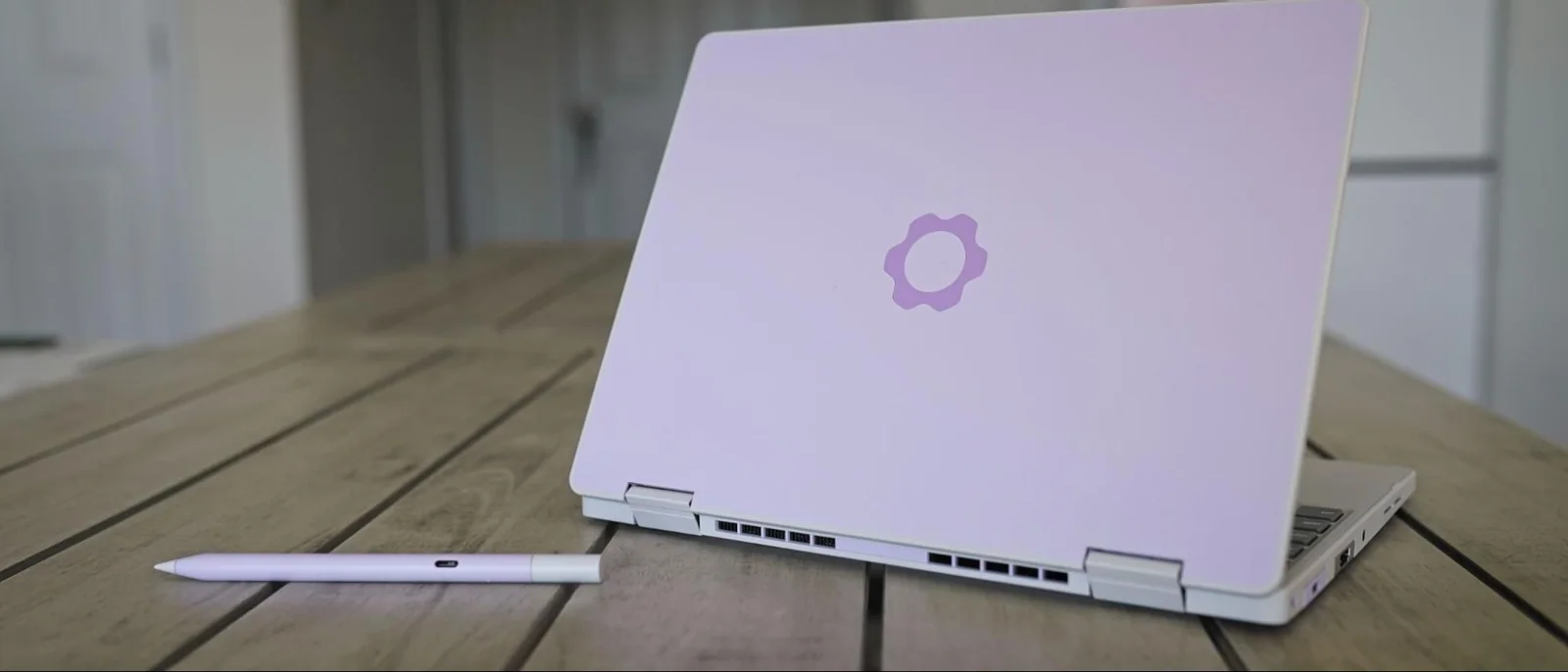
Like Framework’s previous Laptop 12 with 13th-Gen Intel CPUs, the updated version with Wildcat Lake comes in a variety of colors: Black, Gray, Lavender, Bubblegum, and Sage. Our review unit is the Lavender variation. At the time of writing, you need to purchase the DIY version to choose your color; the prebuilt version is currently only available in Sage.
Unlike Framework’s more expensive Laptop 13 Pro, you don’t have the option to customize the color of the bezels, and only Gray and Lavender keyboard options are available now. USB-A and USB-C modules come in a wide array of colors as well, though other expansion modules are limited to a standard silver color. Framework also offers an optional $59 stylus matching the color options available for the Laptop 12.
The Framework Laptop 12 is a highly portable device, though perhaps not as thin and light as you’d expect out of a 12-inch laptop. It is 0.72 inches thick and clocks in at 2.8 pounds, which is thin and light enough, though not on the level of its enclosed competitors. The MacBook Neo weighs about the same at 2.7 pounds, but it is covered in aluminum and is 0.5 inches thick. The XPS 13 with Wildcat Lake is much lighter at 2.2 pounds, thinner at 0.5 inches, and also finished with aluminum.
Considering the bulk of modularity, the fact that Framework managed to get the weight and thickness of the Laptop 12 close to closed-door competitors is remarkable. However, the fact remains that you are often paying a premium with the Framework Laptop 12 compared to the Neo and XPS 13 and, in both cases, getting a laptop that feels less like a premium ultrabook out of the box.
Although the Framework Laptop 12 isn’t finished in aluminum, it still has a metal structure. On top is plastic, which is then coated with thermoplastic polyurethane to absorb impacts. That leads to a plastic feeling externally, though with a smooth, slightly grippy surface that feels good in the hands.
Framework offers an optional backlight on the keyboard, as well as four module slots for expansion ports. The back two support Thunderbolt 4 and DisplayPort Alt mode, and all four support USB 3.2 Gen 2 speeds and USB-PD. A 3.5mm headphone jack is standard on the Framework Laptop 12, regardless of the additional modules you choose.
Productivity Performance
Our test machine came with the highest-end chip Framework offers in this laptop, which is the Core 7 350. It is a 6-core / 6-thread CPU with a maximum turbo clock of 4.8 GHz, operating between 15W and 35W.
Wildcat Lake is the younger, weaker sibling of Panther Lake. It uses Intel’s cutting-edge 18A node but with several cut corners. For starters, the 350 comes with just two faster P-cores, while the remaining four are an LPE cluster. It also comes with just 6MB of last-level cache, half of what you get with Panther Lake.
The cores matter less here than the memory, however. Wildcat Lake exclusively uses single-channel DDR5 or LPDDR5X, regardless of capacity, with support going up to 64GB. In practice, that often means you need to overbudget your capacity. Performance drops noticeably at 8GB with Wildcat Lake.
The Core 7 350 comes in behind in single- and multi-core performance in Geekbench 6 compared to the A18 in the MacBook Neo. Compared to the 6-core Core 5 320 in the XPS 13, the Framework Laptop 12 is in lockstep with multi-core speed and just shy of 5% ahead in single-core speed.
Compared to full-fat Panther Lake in the Framework 13 Pro, Wildcat Lake actually looks better than expected. What’s interesting in Geekbench is how the X7 358H in the Framework 13 Pro scales relative to the Core 7 350.
The X7 358H is a 16-core chip with a 4.8 GHz boost and access to up to 80W of total power. Despite more than doubling total core count and offering a doubling of P-cores, we’re not seeing twice the performance. Even with access to less power, the Core 7 350 is within 5% of Panther Lake’s single-core performance.
With Geekbench, Apple silicon tends to perform especially well, particularly in single-core tasks, so keep that in mind.
Even with extra clock speed, the Framework Laptop 12 with the Core 7 350 came in behind the Core 5 320 in the XPS 13 in Handbrake. Here, the Geekbench swing toward Apple levels out; the A18 was 8% ahead in Geekbench 6 multi-core, but it is less than 3% ahead here in Handbrake.
The Panther Lake-based 13 Pro gives context, showing compounding factors between higher core counts, higher power limits, and true dual-channel memory. The Framework Laptop 12 performs largely in line with expectations for laptops in this class.
Perhaps the biggest takeaway is how similar the Core 5 320 is in this chassis. You get an extra 200 MHz on the CPU and 100 MHz on the GPU with the Core 7 350, which doesn't move the needle heavily given platform limitations. Choosing the Core 5 320 will save you $220 compared to the Core 7 350.
The Core 7 350 has just two Xe3 graphics cores, as do other Wildcat Lake chips, which does not provide enough horsepower for most modern gaming titles.
We were able to achieve 30 FPS in Civilization VI at 1080p, underscoring the limitations of the integrated graphics. Intel’s dual-core Xe3 is capable of running lighter indie titles like Balatro or Vampire Survivors, but otherwise serves primarily to provide display output.
Display
The display is what separates the Framework Laptop 12 from other Wildcat Lake-based devices, and not for the better. Color performance is weak in testing, and although peak brightness is in line with similar laptops, the 60Hz refresh rate and 1080p resolution are severe downgrades compared to competing devices.
For metrics, the display peaked at 451 nits, right in line with the MacBook Neo and Framework 13. However, gamut coverage is poor, with just 64.9% of the sRGB gamut measured compared to wide-gamut coverage on competing machines. This is a budget laptop, but it easily runs over $1,000 with most configurations where this display falls short.
The XPS 13 provides important context. It comes with a 120Hz refresh rate, a higher 2.5K resolution, and a touchscreen like the Framework Laptop 12. The Framework Laptop 12 clocks in at $1,271 with a Core 5 320, 16GB of memory, and 500GB of storage, whereas the XPS 13 is $1,000 for that configuration.
Framework needs to cut corners at this price point to engineer devices to be repairable and upgradable. Still, the display is a constant reminder of budget compromises, whereas competitors make it easy to forget during day-to-day work.
Keyboard and Touchpad
The Framework Laptop 12 comes with a standard keyboard/touchpad combo unit available in several layouts. There are currently gray and lavender options for the keyboard unit, with Framework likely expanding offerings later.
The keys feature standard 19mm spacing and a generous 1.5mm of key travel, making it comfortable to type on despite the small footprint of the device.
The mechanical touchpad is naturally small given the device size, leading to sharp dips during presses on the bottom corners and no responsiveness near the top. It is a serviceable touchpad for this class of device.
Upgradeability
Framework built its brand on upgradability, so the Laptop 12 earns near-perfect marks here. You can buy it pre-assembled or as a barebones system accepting your own M.2 2230 SSD, DDR5 SODIMM, and operating system. You can also swap out the keyboard, display, mainboard, and ports.
However, the laptop brings up an important distinction between serviceability and upgradability. While it excels at serviceability, the Wildcat Lake chip introduces limitations with its single-channel memory interface.
You can upgrade memory up to a 64GB DDR5-6400 SODIMM, but there is only one physical memory slot on the board. Wildcat Lake exclusively uses single-channel memory, meaning you cannot add a second SODIMM later to double your RAM.
You will not find a more serviceable laptop on the market, but upgrade paths remain narrow: more storage and higher memory capacity without true dual-channel support.
On the serviceability end, Framework makes things simple with a matching Torx screwdriver to detach the bottom cover. The cover features eight captive screws, and components can be easily accessed from beneath the keyboard.
Framework includes clear labeling and QR codes linking directly to online repair guides for various internal components.
Battery Life
Using Fedora 44, which offers out-of-the-box optimizations for Wildcat Lake, we tested the device using a basic web-browsing loop to evaluate the 50Whr battery.
The laptop achieved an average of roughly 9 hours across three runs with the screen set to 150 nits and Wi-Fi enabled. Getting a full day of work out of a small 50Whr battery is solid performance.
Audio
The stereo 2W speakers inside the Framework Laptop 12 are surprisingly powerful given the machine's size, though microphone quality presents a clear compromise.
The internal microphone is heavily compressed to capture voice clearly, but this comes at the cost of picking up background noise, including keyboard and trackpad clicks.
The speakers do not distort at full volume and emphasize the upper midrange to simulate a richer low end than the small drivers can physically produce.
This tuning avoids tinny audio output and helps human voices come through clearly.
Heat
The Framework Laptop 12 stays fairly cool under load, with the underside peaking at 101 degrees Fahrenheit (38 degrees Celsius) in the middle during heavy usage.
Temperatures around the keyboard measured 94 degrees Fahrenheit (34 degrees Celsius), remaining manageable during extended workflows.
Webcam
The webcam quality is poor, utilizing an odd 4:3 aspect ratio. The 2MP sensor creates a soft image that struggles heavily with low light and dynamic range.
Testing in natural daylight near an open window revealed significant visible noise and a struggle to balance bright background light against facial shadows.
The camera struggles significantly when handling standard everyday lighting conditions.
Software and Warranty
Framework offers a standard one-year limited warranty, with an optional three-year warranty available for purchase. Normal wear and tear or third-party modifications void coverage.
Broad warranty protection is less critical here since modular components like USB-C ports can be easily purchased and replaced independently.
While users can bring their own OS, Framework offers pre-installed Windows 11 or Fedora 44, with Fedora including specific kernel optimizations for Wildcat Lake.
Configurations
Framework offers three mainboard configurations: Core 3 204, Core 5 320, and Core 7 350. The Core 5 320 offers similar performance to the Core 7 350 while acting as the sweet spot for pricing.
The DIY edition ships without memory or storage, offering a single SODIMM slot and an M.2 2230 slot alongside modular port cards.
Display options remain limited to the standard 60Hz 1080p panel, while keyboards are available in backlit and non-backlit variants.
Prebuilt versions scale from the Core 3 model with 8GB RAM at $699 up to the Core 7 model with 32GB RAM at $1,399.
Dell starts higher with the XPS 13 at $799, but provides a more competitive package when configured with 16GB of memory.
Bottom Line
The Framework Laptop 12 is caught between component market shortages and a wave of budget Windows laptops that skip repairability in favor of better out-of-the-box trimmings. The primary hurdle is that users will likely spend more compared to other Wildcat Lake options.
With the Core 5 320, the Framework Laptop 12 is nearly $300 more expensive than the XPS 13 when both feature 8GB of memory and 500GB of storage. Prices for the Framework often exceed $1,000 once users move past the base Core 3 processor.
Modularity comes at a distinct cost premium. This extra expense is damaging when competitors offer superior display performance and all-aluminum bodies for less money.
If you already have harvestable SODIMM and SSD modules, this is a cost-effective way to access Intel’s latest silicon. For everyone else, unless paying a significant premium for repairability is a priority, better and cheaper alternatives exist.