Hardware Meets Software Limitations
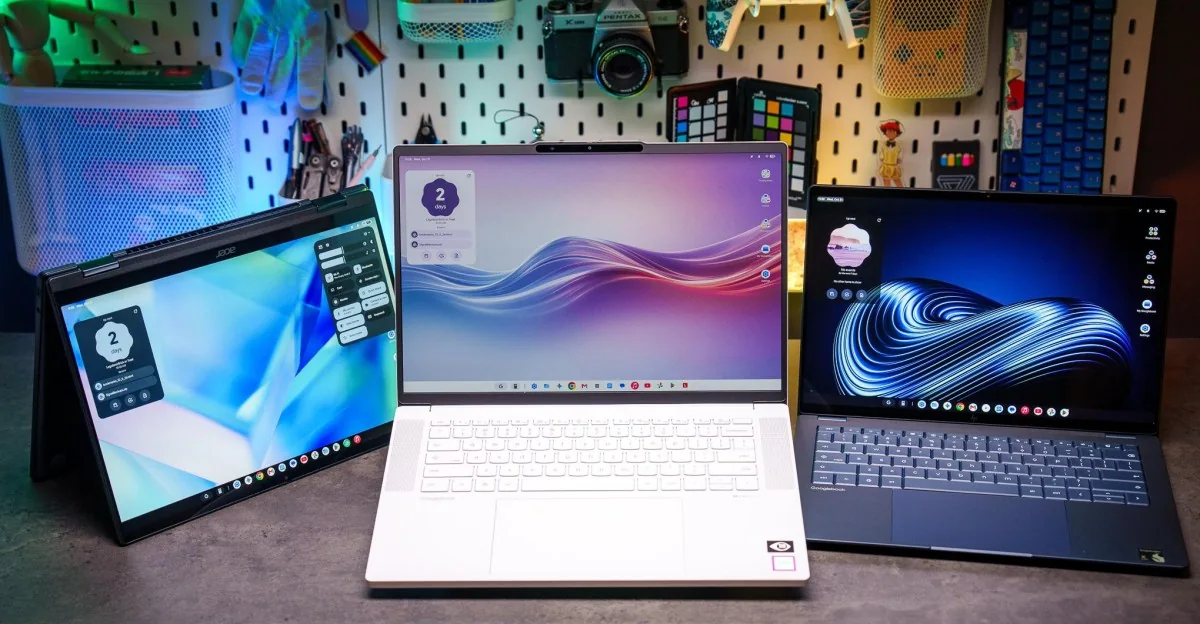
Every Googlebook laptop evaluated at launch features great hardware. The core issue lies entirely within the software. While Googlebook OS introduces interesting concepts for bridging laptops and smartphones, it currently delivers a frustrating experience marked by bugs and lackluster app support. It often feels like operating an Android tablet with a keyboard and trackpad awkwardly attached rather than functioning as a cohesive laptop OS. This represents a significant missed opportunity because the keyboards, trackpads, and general physical components are remarkably well-crafted.
Starting at a base price of $900, consumers naturally expect quality processors, sturdy metal chassis designs, high-end displays, capable speakers, and superior input devices. The Googlebook lineup meets these physical expectations while also delivering respectable battery life and a minimum of 16GB of RAM.
Google intended for these devices to feel premium, and manufacturing partners HP, Acer, Lenovo, Dell, and Asus delivered on that front. However, Google's software infrastructure remains underdeveloped. In their current state, the source review advises against purchasing any of the launch models, though the underlying hardware highlights notable long-term potential should the operating system mature.
For dedicated early adopters or enthusiasts tracking the platform's evolution, examining the individual models reveals distinct strengths and weaknesses across the hardware ecosystem.
Manufacturer Breakdown: Acer and Dell
The Acer Googlebook 14 functions as a 2-in-1 convertible featuring a lightweight, sturdy metal chassis paired with a striking 2880 x 1800 120Hz OLED touchscreen supporting styluses. Despite its physical appeal, current software limitations prevent portrait orientation in tablet mode, restricting its utility for stylus workflows. The Dell XPS Googlebook prioritizes portability at 2.2 pounds with a 13.4-inch screen, providing a reliable compact alternative with comfortable input devices and solid Qualcomm performance, though its anti-reflective screen coating introduces a slight shimmering effect.
Audio performance across these compact units is generally balanced, though built-in speakers lack deep bass and webcams can appear somewhat muted. Battery life remains a consistent bright spot, frequently delivering eight to nine hours of mixed productivity use on a single charge.
If these machines ran a mature operating system, they would represent compelling options. However, software volatility cautions against purchasing hardware based purely on future software promises.
Hardware analysts suggest that Googlebooks function best as secondary computing devices rather than primary workstations, offering fast, streamlined environments for users deeply integrated into the Google ecosystem.
The Dell XPS Googlebook exemplifies this portable secondary form factor, delivering a lightweight aluminum frame that handles travel demands easily while maintaining adequate all-day battery endurance.
While matte display coatings successfully reduce harsh office glare, they can occasionally diffuse panel sharpness, prompting users to rely on maximum brightness settings during daytime usage.
Google continues to issue rapid software patches, but missing desktop-class capabilities and window-management bugs continue to hinder productivity workflows.
HP and Asus Offerings
The HP Googlebook 14 reinforces the consensus that hardware manufacturing is not the bottleneck for this platform. Offering configurations with Snapdragon X Elite processors, up to 32GB of RAM, and 1TB of storage, the HP variant packs impressive performance into a slim form factor reminiscent of ultra-portable benchmarks.
The device features a vibrant 2880 x 1800 OLED touchscreen with punchy brightness levels and accurate color reproduction, making it well-suited for media consumption and light photo editing tasks.
Connectivity options remain somewhat sparse on select models like the HP, which limits physical inputs to dual USB-C ports and a headphone jack, requiring dongles for legacy peripheral support.
Platform-specific shortcuts integrated into the keyboard layout enhance navigation speed, though decorative lid accents add minimal functional utility to the overall daily experience.
From a purely hardware perspective, premium pricing reflects the luxury tier construction, leaving software refinement as the primary hurdle.
Asus steps into the market with a robust hardware package that handles intensive multitasking efficiently, though demanding tasks can generate noticeable chassis warmth.
Priced at $1,299, the Asus Googlebook 14 represents the highest entry cost among initial launch devices, pairing an Intel Core Ultra 5 processor with generous RAM and responsive daily performance.
Unlike several competitors, the Asus model boasts a comprehensive selection of input ports, including dual USB-A slots, dual USB-C connections, and a dedicated HDMI output, eliminating adapter requirements for most desktop configurations.
Tactile keyboard feedback and a smooth matte 120Hz OLED screen elevate the physical user experience, though competition at this price bracket remains fierce against established laptop ecosystems.
At a $1,299 price point, buyers face stiff competition from traditional clamshells offering fully mature operating systems and broader software compatibility.
Lenovo Googlebook 15 and Verdict
The Lenovo Googlebook 15 provides a spacious screen real estate within a lightweight 2.8-pound chassis, featuring a large haptic trackpad and solid battery endurance across standard work routines.
While the larger footprint allows for improved stereo separation in audio playback, minor ergonomic drawbacks like slightly wobbly keycaps prevent the keyboard from matching industry benchmarks.
Bundled promotional accessories such as Bluetooth mice featuring dedicated assistant triggers provide minor cosmetic utility without fundamentally altering the operational experience.
Ultimately, the launch lineup demonstrates that while hardware engineering has successfully cleared high design bars, the supporting software ecosystem requires extensive refinement before winning over mainstream consumers.