Overview and Key Features
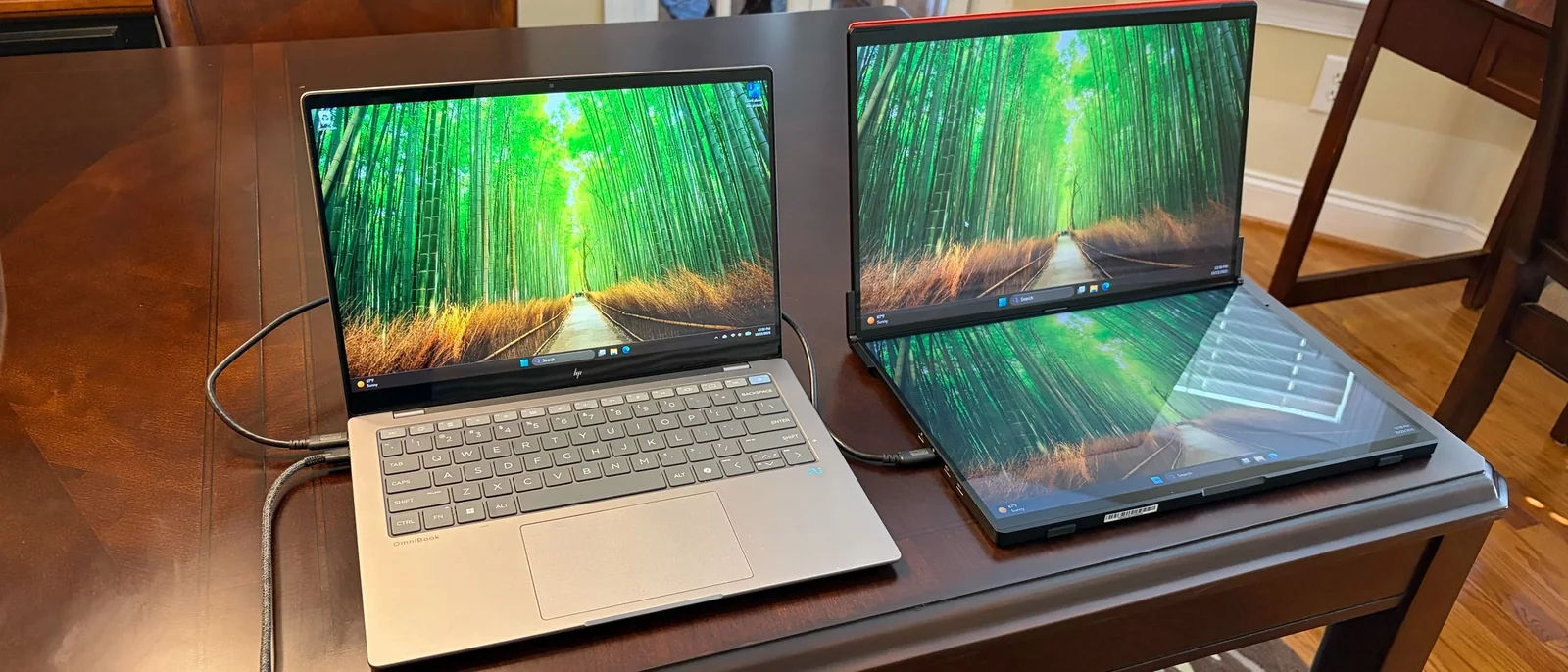
The FlipGo is yet another entry into the portable dual-monitor field from JSAUX, and it definitely makes a good first impression. Not only do you get two 16-inch 2560 x 1600 IPS displays, but the FlipGo also supports touch input on Windows systems. In addition, it incorporates a built-in USB hub that gives you two additional USB-A ports and one USB-C port for your peripherals.
JSAUX provides all of this functionality in a product that comes in at a bit under $500, which is in line with other portable dual-monitors on the market. However, there’s a hefty toll for the functionality that’s provided in this package for those expecting to actually use it as a travel companion.
Design of the JSAUX FlipGo (PM0204)
When I first received the shipping box for the FlipGo, I was shocked at how large and heavy it was. My shock was made even more apparent when I removed the FlipGo from its protective padding, revealing a massive dual-screen device weighing an incredible 4.18 pounds. That’s more than half a pound heavier than a 14-inch Apple MacBook Pro.
The choice of materials contributes to the 4+ pound weight of the FlipGo. JSAUX uses a thick aluminum chassis that resists flexing and feels incredibly premium to the touch. That premium feel even extends to the hinges that connect the two displays. They are robust, with no play, allowing you to easily open the FlipGo to whatever display angle you desire.
While JSAUX labels the FlipGo as a portable monitor, this is not something that you’ll be able to easily slip into a laptop bag or even a backpack. The dual 16-inch screen frame measures 14.41 x 9.45 inches and is 0.7 inches thick. For most people, the FlipGo will take up a permanent residence on your desk, or perhaps travel with you from one side of your office building to the other.
Display Specs and Connectivity
With that said, the specs on the FlipGo are quite impressive. You get two 16-inch 60 Hz IPS displays, each with a resolution of 2560 x 1600. Considering that most competitors in this space give you dual 1920 x 1080 panels, this resolution upgrade is much appreciated here.
Both screens feature a glossy finish, which is uncommon for dual-screen monitors. However, that’s because both panels support 10-point touch input natively in Windows 11. Unfortunately, touch input is not supported in macOS, so you’ll want to consider the non-touch model if you’re a Mac user.
Connectivity-wise, the FlipGo’s primary ports are on the left side of the bottom panel, including two USB-C ports and two mini-HDMI ports. On the right side, the internal USB hub provides two USB-A and one USB-C port. Adjacent to the USB hub hookups is a three-way jog wheel for the OSD and the power button.
JSAUX offers a stand that allows you to prop the FlipGo up in landscape or portrait mode. Our review unit only came with a red faux leather protective cover, allowing use with the bottom panel sitting flat on the desk or in portrait mode.
OSD on the JSAUX FlipGo (PM0204)
The FlipGo uses a relatively basic on-screen display controlled using a three-way jog wheel. Despite there being two displays, you don’t have independent control over picture settings. Adjustments made on one display apply to both.
You can flick the wheel right or left to adjust brightness. Moving up and down navigates through the OSD, while pressing on it selects an option. Pressing once on the power button takes you back one menu, and a long press turns off the monitor.
You’ll find the usual assortment of adjustable settings in the OSD, like brightness, contrast, sharpness, color temperature, saturation, and hue, along with options to switch between HDMI and USB-C inputs.
Connecting and Operating the JSAUX FlipGo (PM0204)
The FlipGo comes with two USB-C cables, a mini-HDMI to HDMI cable, and a USB-C wall adapter. Because touch input and extended mode have limitations on macOS, all testing was performed with a Windows 11 laptop.
Setting up the FlipGo couldn’t have been easier. With a USB-C port supporting DisplayPort, a single cable handled both power and video/data. The FlipGo also supports 60-watt power passthrough to your laptop via a second USB-C port.
Using a single cable, I primarily used the two displays in portrait mode to keep two separate webpages open side-by-side next to the laptop's internal panel.
Touch support functioned as expected on both panels without needing to install any additional software, operating flawlessly.
Display Performance and Verdict
The FlipGo uses two 16-inch IPS panels, each with a resolution of 2560 x 1600 and a refresh rate of 60 Hz. JSAUX listed maximum brightness at 500 nits, but test numbers showed a lower figure.
The large panel sizes combined with the extra resolution over 1080p panels made them ideal for multitasking, such as pairing a webpage with Microsoft Word or Excel, limiting the need to scroll up and down.
Compared to the previous FlipGo Horizon Pro, the panels on this model were far superior, offering more vibrant colors and higher brightness (319 nits versus 247.4 nits), though still short of the advertised 500 nits.
For color tests, the FlipGo covered 97.2 percent of DCI-P3 and 137.2 percent of sRGB color spaces, putting it well ahead of competitors like the Aura Triple Aero 15.6 Pro Max.
Bottom Line
The JSAUX FlipGo is a remarkable piece of hardware for productivity. It impresses with high-quality build, stiff hinges, plentiful video inputs, and an integrated USB hub.
The FlipGo tops the charts in color performance and brightness, justifying its price. While its 4.18-pound weight is heavy for travel, it makes a perfect companion for expanding desktop screen real estate.