Unlocking Nvidia Tensor Performance
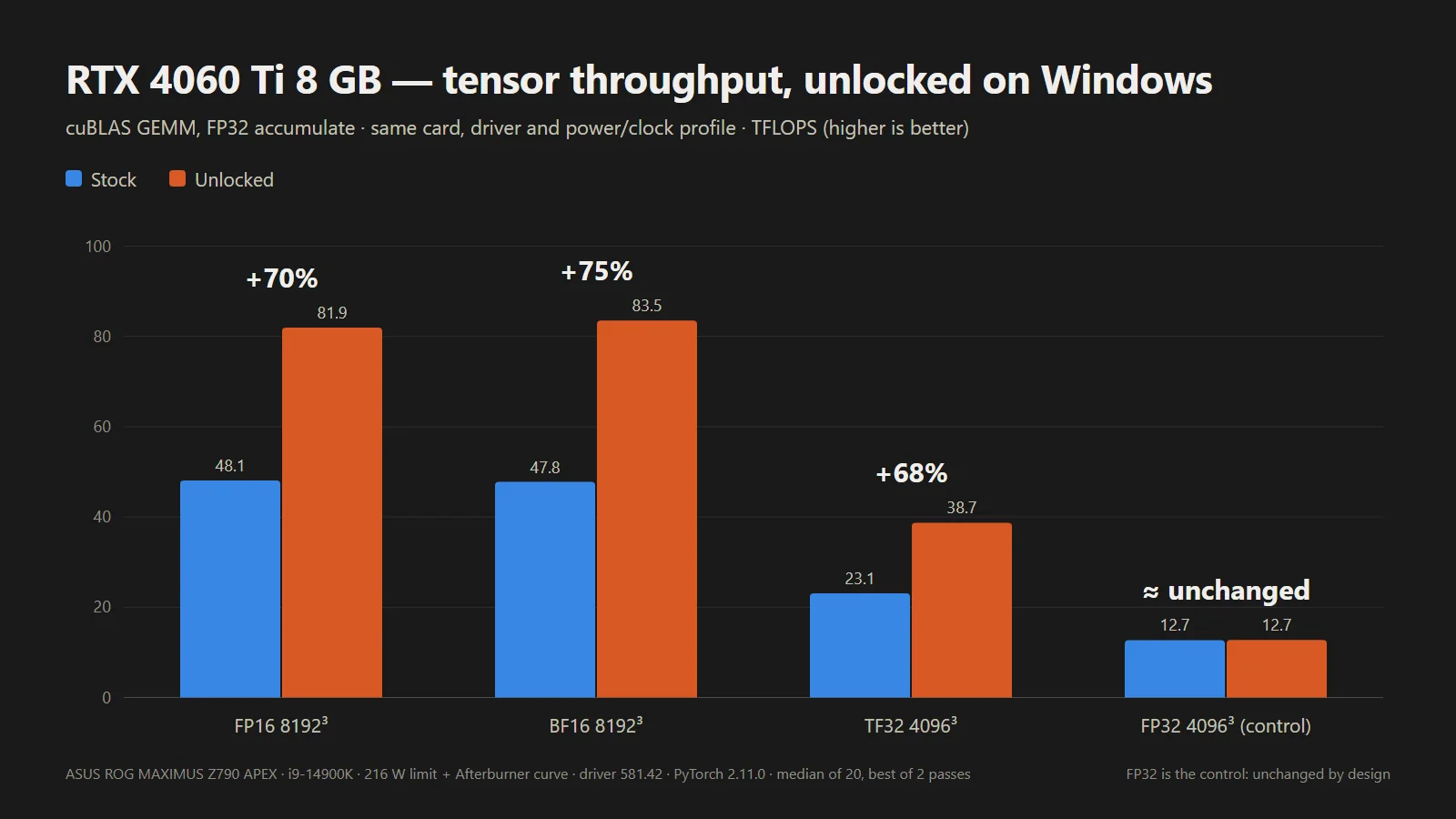
A new open-source UEFI tool boots from USB and unlocks significant extra tensor performance on RTX 20, 30, and 40-series desktop and laptop GPUs, making the half-speed AI throttle hack a whole lot easier to try on Windows. No VBIOS flash or patched driver needed: the tool runs from a FAT32 stick before the Nvidia driver loads at every boot, and then voila, the developer’s own laptop RTX 4060 hit 65% higher FP16 math.
The UEFI pre-driver NVIDIA GPU unlocker project removes Nvidia’s tensor limiter using the community V67 payload with read-back verification. This tricks Nvidia’s signed Booter firmware into opening the write lock on two speed-selector registers, allowing the tensor units to run at full rate. The unlock can now run entirely from a bootable USB drive, on Windows as well as Linux, whereas previously it worked primarily through manually installed Linux modules, with Windows support only experimental. The read-back verification part makes things safer, which was a concern with the experimental builds.
Firmware Verification and Compatibility
The release ships only scripts and self-built binaries, without any Nvidia firmware in the download. Instead, one of the scripts grabs Nvidia’s public driver packages, verifies them, then rebuilds the firmware files locally. The project credits Zagitta’s gpu-unlock as its porting source and builds on several other community projects, including the RTX 40 fork gpu-unlock-ada and an earlier Windows EFI tool. Having one tool for the many GeForce owners on Windows should significantly open up the hack to a wider audience. Previously, it was scarier-looking, and project progression is rapid these days with AI tools.
The steps right now involve downloading the release, running that script, and then copying the rebuilt files and a bootloader file for booting to a FAT32-formatted USB stick. The unlocker can then be run from a one-time boot menu by using the spacebar within 30 seconds for confirmation. Once complete, things are handed off to the respective OS loader.
System Requirements and Caveats
The unlocker runs in a firmware stage before the OS loads Nvidia’s GPU driver, which means there’s no need to flash the card’s video BIOS or to modify the driver; as the FAQ puts it, the unlock doesn’t persist through power loss. The trade-off is running it again on every boot. The system must be booted in UEFI mode with Secure Boot either off or set to trust a self-signed EFI. For a game’s anti-cheat that requires Secure Boot, the tool cannot bypass this requirement, a developer team member relayed on Reddit. RTX 20 owners have to run a bundled script once to switch the Windows Nvidia driver into GSP firmware mode, before restarting.
Laptop GPUs were already supported by earlier projects, but here one of the developer’s own test cards is a laptop GPU, and laptop results are logged card by card. For laptops, the discrete Nvidia GPU must be powered at entry, which means dGPU-only, or MUX, mode is recommended. On Linux distributions such as Ubuntu, runtime power management can power down the GPU when idle and silently erase the unlock. The English FAQ covers workarounds for this, with instructions and guidelines for other situations.
Compatibility otherwise includes RTX 20-series support listed as fully compatible with some models having known issues, while RTX 30-series cards are fully compatible, and the tool is fully compatible on laptops and desktops using RTX 40-series cards. The GTX 16 is theoretically compatible with verification pending, but other cards, including pre-Turing, the GA100, and RTX 50-series cards, are unsupported. The project routes support by chip family, so a card being covered doesn’t mean that specific card has been tested.
Results compare each card before and after the unlock on the same test, but the tests differ from row to row, so they shouldn’t be compared across cards.
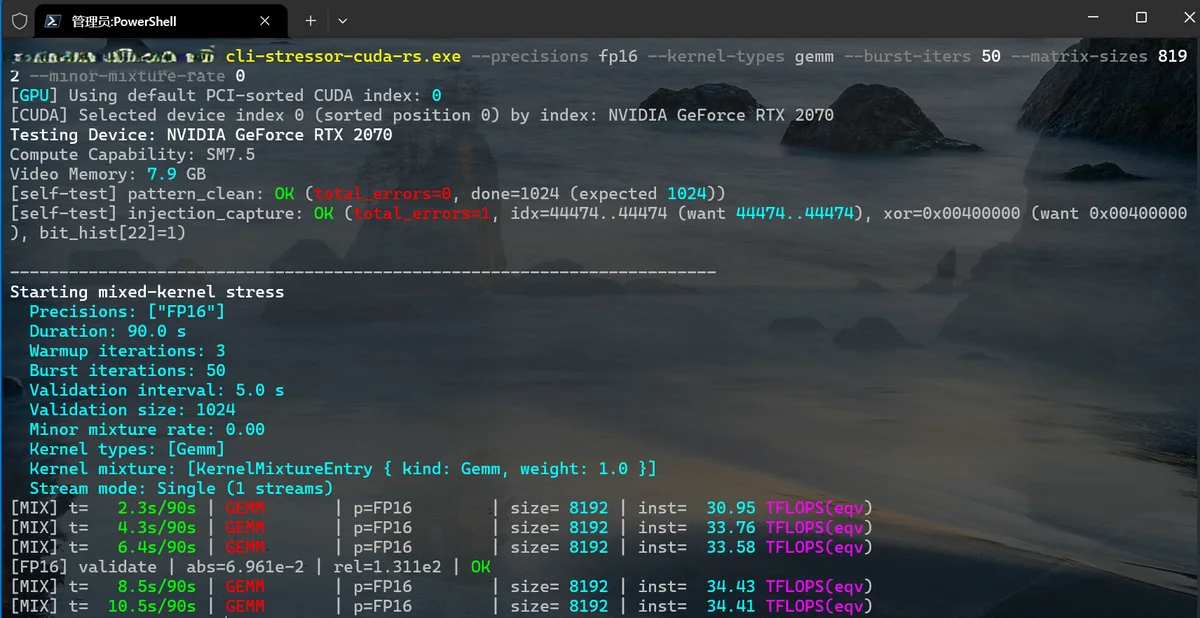
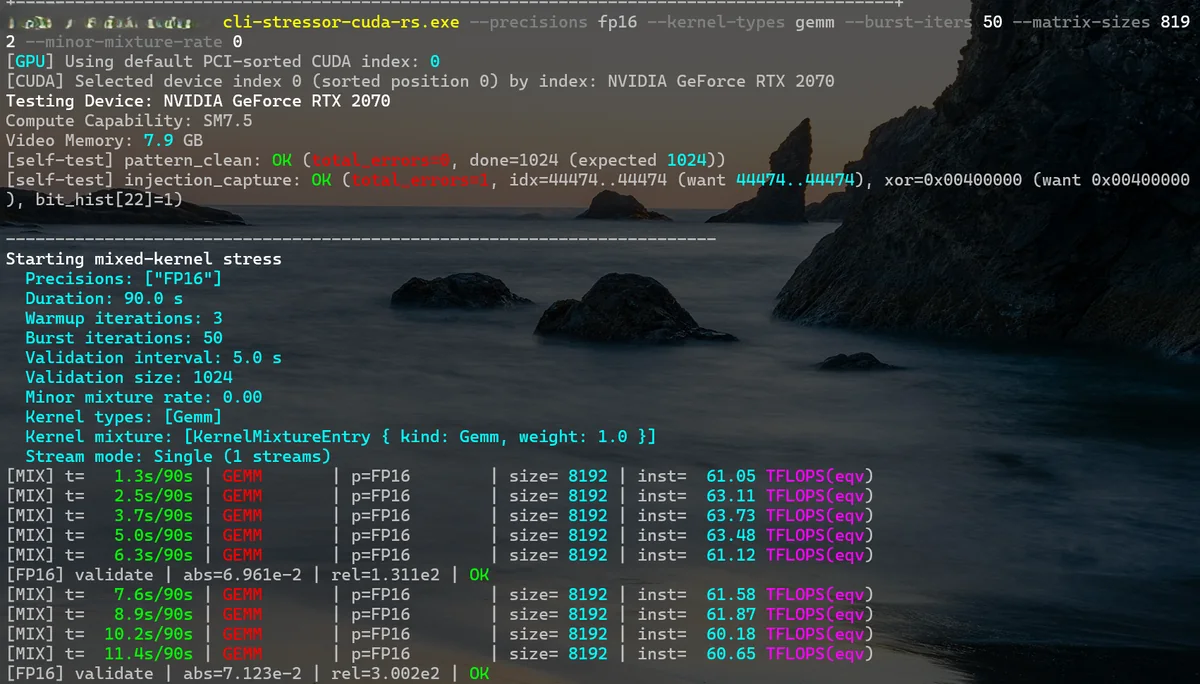
The developer’s own desktop RTX 2070 went from about 34 TFLOPS in FP16 matrix multiply at 8192 to around 62 TFLOPS in the benchmarks.
Limitations and Future Development
Some caveats still exist, and Zagitta, whose gpu-unlock kicked off the GeForce unlocks, now says in its FAQ that they do not run Windows and do not plan to maintain it, pointing Windows users to a separate port and warning to be careful with unofficial Windows installers. Results from the unlock are also contingent on power and thermal limits. The new project says it can be combined with power-limit unlocks, but warns this can exceed factory power and thermal envelopes. A per-card ROM hash check, which the project’s own safety rules require, isn’t built yet, and the unlock’s persistence on Thunderbolt eGPUs is not guaranteed.
Other cards, including the RTX 2080 and the RTX 2080 Ti, are under review. No dates are promised. The pro-card tensor feature can now be unlocked for many, though, and as simply as using a USB boot drive, which will get even easier with a boot-from-disk toggle the team says is in the works. RTX 50-series owners have to wait, for now, as the team is still trying to crack those cards, which feature significantly more security than anticipated.