Introduction
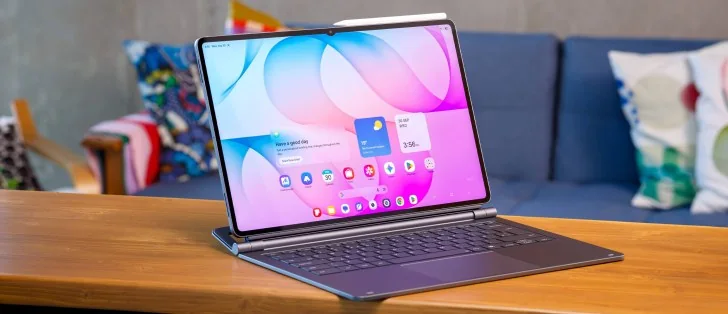
The largest mainstream tablet on the market has received its annual hardware update, bringing notable internal and external refinements. The Galaxy Tab S12 Ultra features an upgraded processor with enhanced cooling architecture, improved connectivity standards, and the latest Android operating system heavily integrated with advanced artificial intelligence tools.
Built as an ultra-slim metal slate, the Tab S12 Ultra incorporates a massive 14.6-inch AMOLED display running at an 1848 x 2960 resolution with a 120Hz refresh rate and HDR10+ support. An S Pen stylus is conveniently bundled directly in the box.
Furthermore, the tablet maintains its standout position as one of the few high-end slate devices offering full IP68 certification for dust and water resistance.
Under the hood, the device runs on the Dimensity 9500 platform, delivering notable generation-over-generation speed increases across its CPU, GPU, and NPU architectures compared to its predecessor.
For photography and video communication, the hardware includes a dual-lens rear configuration alongside a wide front-facing sensor housed within the display bezel structure.
Energy is supplied by a large 11,600mAh internal battery that supports 45W wired charging capabilities.
Marketed as a flexible productivity ecosystem, the hardware leverages Samsung DeX, optional mechanical keyboard accessories, and One UI software built on top of Android.
Samsung Galaxy Tab S12 Ultra specs at a glance:
Body: 326.3x208.5x5.1mm, 692g; Glass front, aluminum frame, aluminum back; IP68 dust tight and water resistant, Stylus support, Enhanced Armor Aluminum.
Display: 14.60" Dynamic AMOLED 2X, 120Hz, HDR10+, 1000 nits (HBM), 1600 nits (peak), 1848x2960px resolution, 239ppi.
Chipset: MediaTek Dimensity 9500 (3 nm).
Memory: 256GB 12GB RAM, 512GB 12GB RAM, 1TB 16GB RAM; UFS; microSDXC card slot.
OS/Software: Android, up to 7 major OS updates, One UI.
Rear camera: Wide (main): 13 MP; Ultra wide angle: 8 MP.
Front camera: 12 MP ultrawide.
Video capture: Rear camera up to 4K@30fps; Front camera up to 4K@30fps.
Battery: 11600mAh; 45W wired charging support.
Connectivity: 5G; eSIM; Wi-Fi 7; Bluetooth.
Misc: Under-display optical fingerprint reader; quad stereo speakers; Wireless Samsung DeX support.
Despite its stellar presentation, the hardware design retains a visible front-facing camera notch. While compact, it remains a minor distraction within an otherwise expansive display area.
Unboxing the Galaxy Tab S12 Ultra
The retail packaging contains the tablet itself, a USB-C data cable, and the hexagonal S Pen stylus.
Although the hardware supports 45W fast wired charging, a compatible power brick is omitted from the box.
Design, build quality, handling
The device features a familiar large slab layout utilizing an aluminum unibody with a slender 5.1mm profile, complemented by its official IP68 dust and water resistance rating.
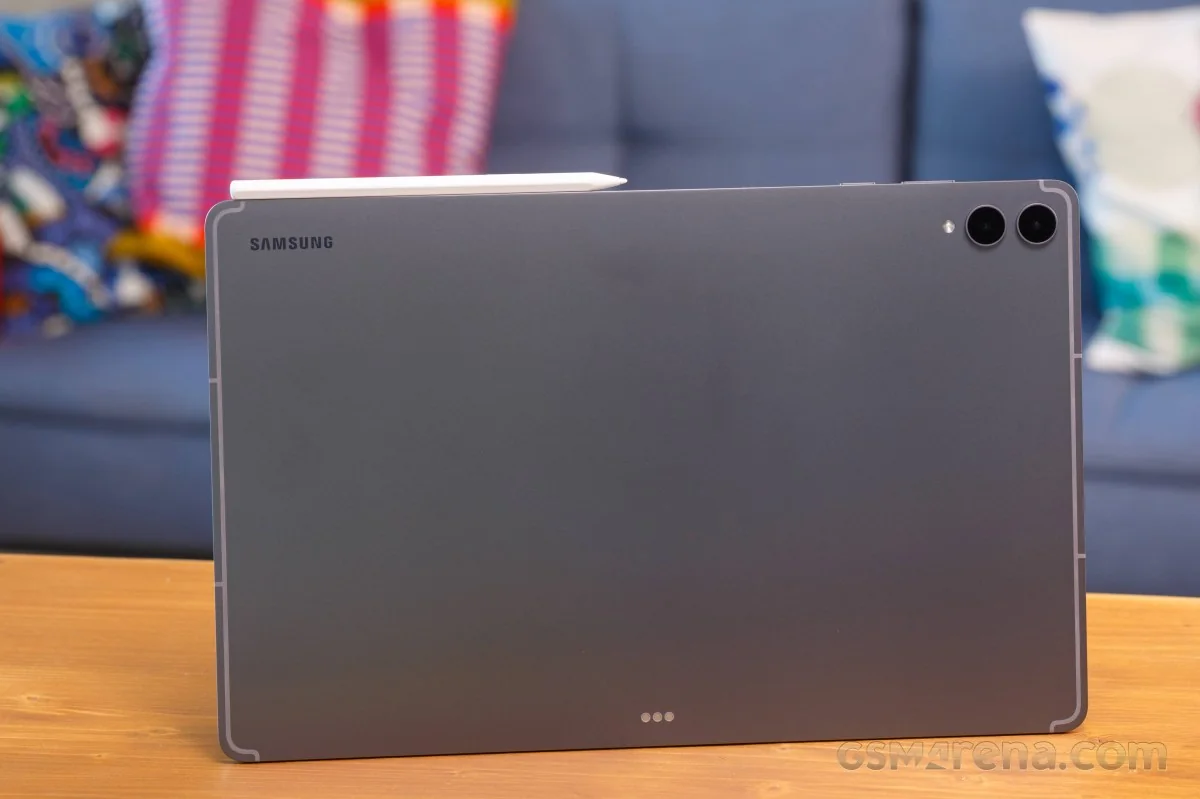
Constructed from enhanced Armor Aluminum—the same material utilized in the manufacturer's flagship mobile handsets—the chassis offers increased deformation resistance and structural durability.
Specific details regarding the front display glass manufacturing standards are not officially disclosed.
Color configurations available include dark gray and silver finishes.
A closer structural examination reveals an exceptionally thin bezel layout surrounding the 14.6-inch panel.
The front display provides ample workspace comparable to a laptop screen, complete with symmetrical borders and responsive stylus integration.
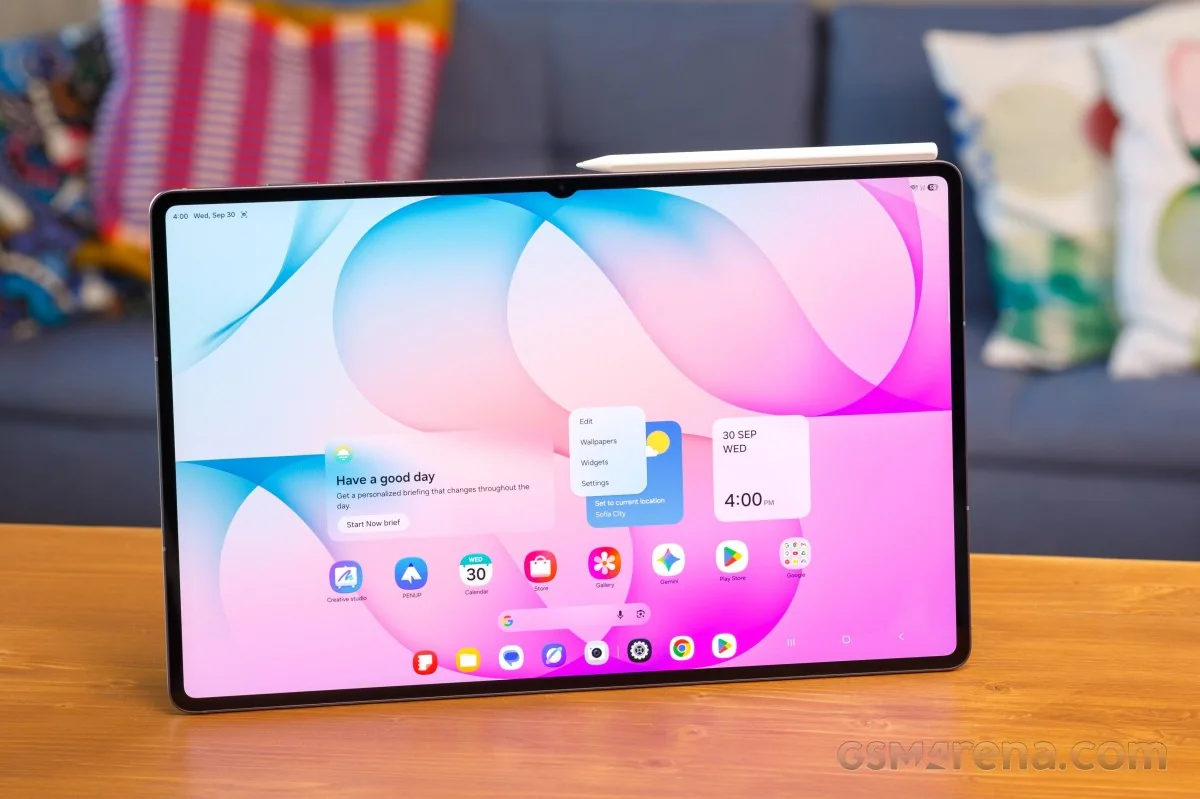
The front camera notch breaks the otherwise unbroken glass canvas, serving as an aesthetic compromise.
An in-display optical fingerprint scanner is embedded into the panel, delivering fast and dependable biometric authentication.
The rear panel maintains a minimalist aesthetic with subtle antenna banding, dual camera rings, and an integrated LED flash module.
Magnetic alignment pins located on the back chassis allow secure attachment for official keyboard peripherals.
The short edges house a quad-speaker array for multi-channel audio output alongside microphone ports and the USB-C interface.
The top edge holds power and volume keys, additional microphones, a SIM/microSD card slot on cellular models, and a magnetic zone for the S Pen.
The stylus can alternatively dock along the bottom edge depending on user preference or keyboard connectivity.
Measuring 326.3 x 208.5 x 5.1 mm and weighing approximately 695 grams, the device is notably thinner and lighter than standard laptop computers despite its large footprint.
Handling feels substantial initially due to the sheer scale of the hardware, but quickly becomes comfortable for extended use sessions.
Samsung Pro Keyboard
The optional Pro Keyboard accessory acts as a secure screen cover and a stable adjustable stand.
The attachment mechanism is secure, preventing accidental detachment during mobility.
The stand mechanism offers straightforward adjustment angles.
The backlit keyboard features dedicated shortcut keys, comfortable key travel, and tactile feedback.
An expansive trackpad supports smooth gesture input and a satisfying click response.
Operating via dedicated pogo pins rather than wireless pairing, the keyboard accessory transforms the user experience when paired with desktop software modes.
Display
The 14.6-inch Dynamic AMOLED 2X display runs at 2,960 x 1,848 pixels with a 120Hz maximum refresh rate and HDR10+ support.
Slim bezels frame the panel, interrupted only by the camera cutout.
Outdoor readability benefits from high brightness output, rated up to 1,000 nits in automatic high brightness mode and reaching 1,600 nits peak performance.
Source testing recorded manual brightness levels reaching over 700 nits with outdoor boost options enabled.
Automatic brightness testing successfully validated manufacturer luminance claims under bright ambient lighting.
Peak luminance measurements on white test patches confirmed high-end panel performance suitable for HDR media consumption.
Minimum luminance levels drop sufficiently for comfortable dark-room reading environments.
The adaptive refresh rate system scales smoothly between high and low thresholds based on active onscreen content.
Adaptive mode serves as the default profile, dynamically modulating refresh speeds to optimize power draw.
The panel scales down to 1Hz for static images and ramps up to 120Hz during active navigation or compatible gaming.
Video playback matches frame rates accurately to source media frequencies.
HDR10+ certification ensures compatible streaming services deliver high dynamic range content reliably.
Battery life
An 11,600mAh internal power cell supplies the device, matching the capacity found in the preceding generation.
Endurance evaluations demonstrate strong active-use longevity, keeping pace with class-leading predecessors.
Charging speed
Fast wired charging speeds reach up to 45W, though users must supply their own charging brick.
Evaluations utilizing official 45W adapters demonstrated rapid capacity replenishment over standard intervals.
Battery percentages recover significantly within the first half-hour of plugging in, achieving a full charge in under an hour and a half given the large capacity.
Software toggles allow users to configure adaptive charging limits and preserve long-term battery health.
Speakers
Four symmetrical audio drivers deliver 4-channel sound staging for immersive media consumption.
Loudness output scores high in evaluations, providing robust audio projection for music and video playback.
Sound profiles offer strong bass presence and clear vocal reproduction, though extreme high frequencies show slight roll-off.
Android 17 with One UI 9
Running Android with One UI, the interface provides optimized standard tablet modes alongside desktop-oriented DeX environments.
The default tablet layout supports lockscreen widgets and standard app grid organization.
Homescreen customization options mirror standard Android tablet conventions.
An integrated app drawer and optimized task manager facilitate quick switching between active applications.
Navigation gestures and soft keys are positioned for easy accessibility along the lower screen bounds.
Split-screen and floating window multitasking operate smoothly across the large screen real estate.
Switching to DeX mode activates a desktop taskbar layout supporting landscape and portrait orientations.
System controls and notification toggles remain accessible within the desktop taskbar framework.
Quick settings and system drawers maintain consistent styling across interface modes.
DeX windows support free movement, resizing, and snapping behaviors similar to desktop operating systems.
Window management options allow maximized scaling while retaining desktop dock visibility.
Gemini AI integration enables Circle to Search functionality, automated text generation, and image creation tools.
Contextual features like Now Nudge automatically trigger split-screen calendar views when scheduling events from messaging threads.
Call Assist additions include background call briefing features that surface relevant calendar details directly on the active call screen.
Now Brief customizable feeds pull data from weather, health, and video sources to generate tailored daily summary cards.
Source feeds integrate with third-party applications to curate personalized content feeds.
Bixby integration offers voice prompt widgets and chat history access.
Proximity to the screen with the S Pen brings up quick menus for drawing assistance, screen writing, and note-taking shortcuts.
Creative Studio applications transform user sketches into styled graphic art using generative tools.
Screen Write captures screenshots for immediate annotation and markup.
Samsung Notes offers deep feature sets for document creation and organization.
Penup provides digital coloring and drawing templates.
Performance and benchmarks
Powered by MediaTek's 3nm Dimensity 9500 processor, the hardware handles heavy computational loads efficiently.
The octa-core processor layout features a high-performance prime core paired with efficiency and performance clusters.
An advanced GPU and dedicated NPU hardware round out the system-on-chip configuration.
Memory configurations range up to 16GB of LPDDR5X RAM and 1TB of UFS 4.0 onboard storage.
A large internal vapor chamber assists with thermal dissipation during extended workloads.
Benchmark evaluations place the chipset near the top tier of modern mobile processors.
The hardware handles office tasks, gaming, and video editing smoothly without noticeable stutter.
Thermal stress testing shows solid sustained performance maintenance over prolonged operating intervals.
Multitasking within DeX desktop environments remains responsive under heavy application loads.
Camera quality
The rear optics carry over previous-generation sensors, featuring a 13MP primary shooter and an 8MP ultrawide lens.
The main camera produces clean images with punchy color rendition and wide dynamic range under adequate lighting.
Digital 2x zoom options rely on sensor cropping and upscaling.
The 8MP ultrawide camera delivers acceptable distortion correction and vibrant colors, though fine detail is moderate.
The front camera provides multiple field-of-view options via software cropping.
Selfie captures maintain accurate skin tones, balanced white balance, and clear facial detail.
Video recording supports up to 4K resolution on main and front sensors with electronic stabilization enabled.
Recorded 4K footage exhibits pleasing color accuracy and dynamic range, though sharpness is occasionally soft.
Ultrawide video captures at 1080p with acceptable quality for general communication purposes.
Our verdict
Pricing for the base Wi-Fi model starts at a high tier, placing it on par with premium flagship smartphones.
While positioned as a laptop alternative, Android software limitations prevent it from fully replacing deep desktop operating systems like Windows or macOS.
The hardware excels with a robust build, expansive OLED display, and powerful Dimensity 9500 processing architecture.
Strong battery longevity and the utility of the optional Pro Keyboard enhance overall productivity.
Serving as a versatile mobile workstation for drawing, typing, and media consumption, it functions as a capable multi-tool provided users understand mobile OS boundaries.