Display and Design
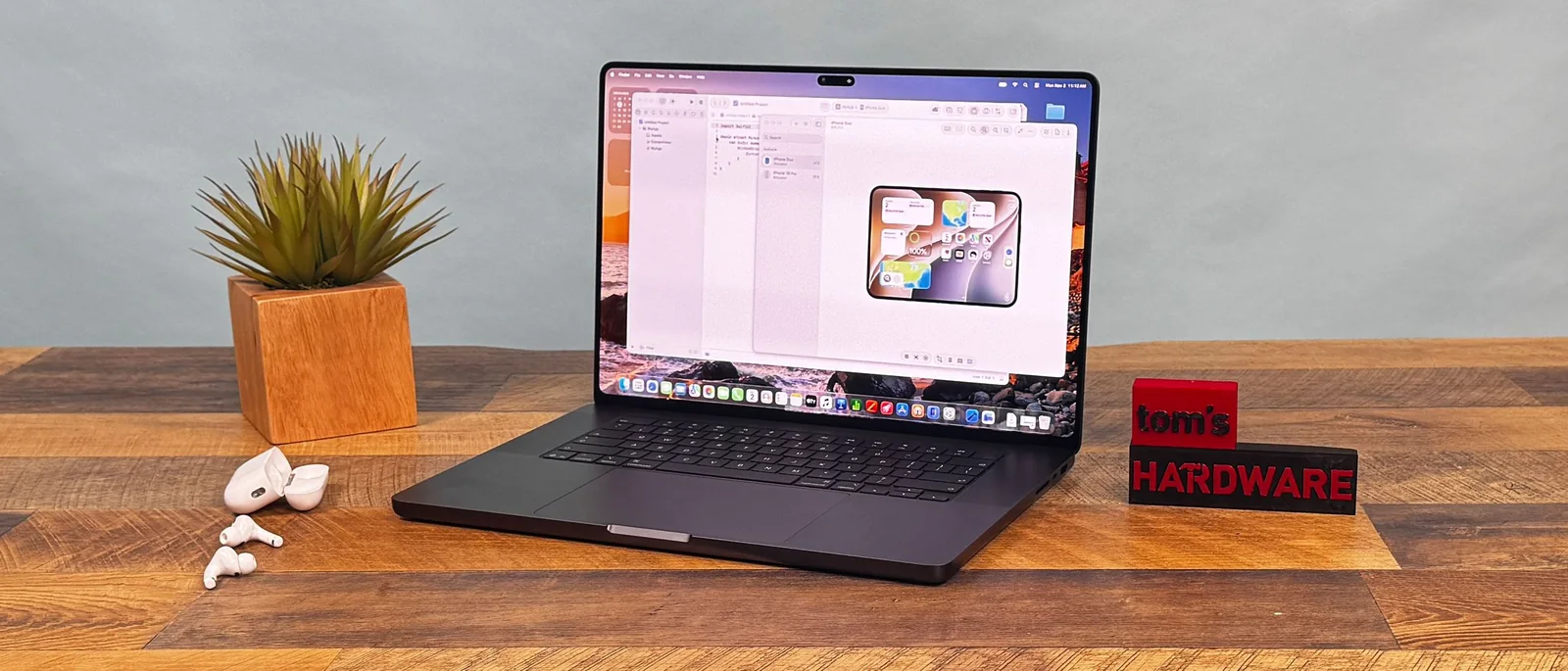
Apple's fans know all about waiting. The company tends to polish features, especially in hardware, that some other laptop vendors release faster. The MacBook Pro with PROLED XDR Display ends the wait for two long-requested elements: OLED and touch, both on the platform for the very first time.
That comes at a price. The 16-inch version we have on review starts at $3,399 and is $7,899 as configured. 14-inch systems start at $2,899. Those are $400 bumps over the existing MacBook Pros with identical chips, making the OLED panel a pricey upgrade.
But those who can afford these high-end systems will get the best display on a Mac, if not laptops in general. Add in a significant reduction in weight and improved speakers, and you're getting a lot of small tweaks that add up over what was already one of the best laptops, even if many of the aesthetics haven't changed.
Design
From a distance, this new MacBook Pro doesn't look all that different from the existing models, which are still on the market. They come in the same colors and largely have the same design. Technically, the new OLED display stack allows for a thinner system, but our 16-inch review unit, at 16 mm thick, is just 0.8 mm shorter than an equivalent 16-inch MacBook Pro with Liquid Retina screen.
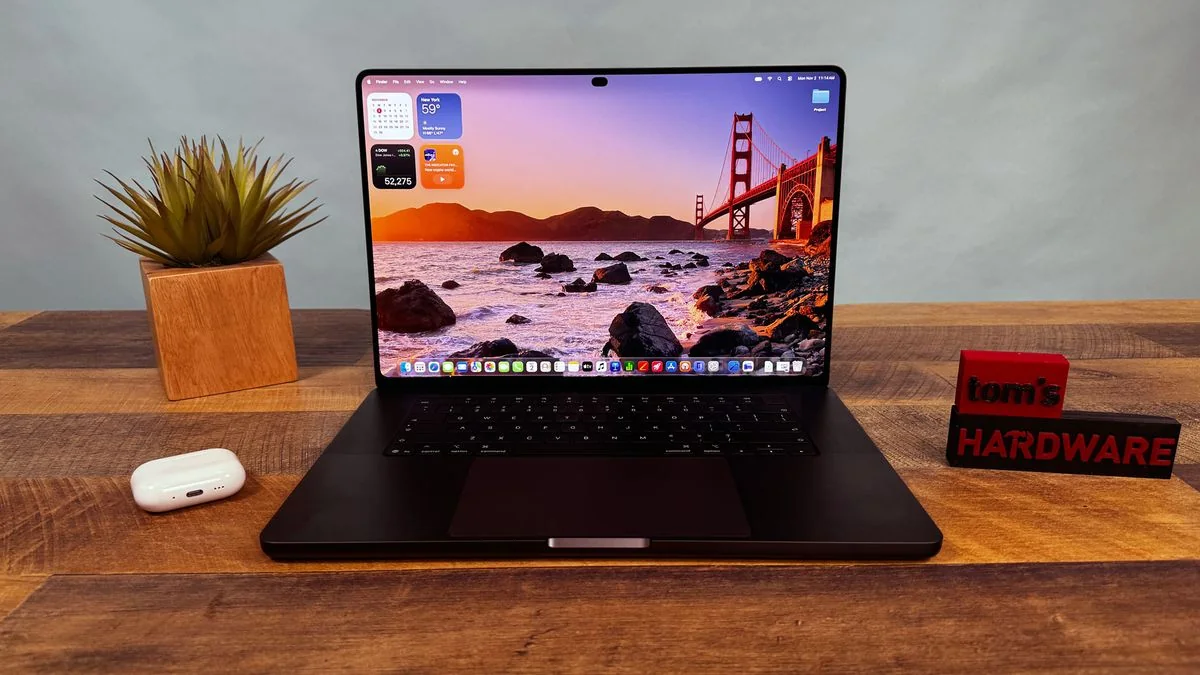
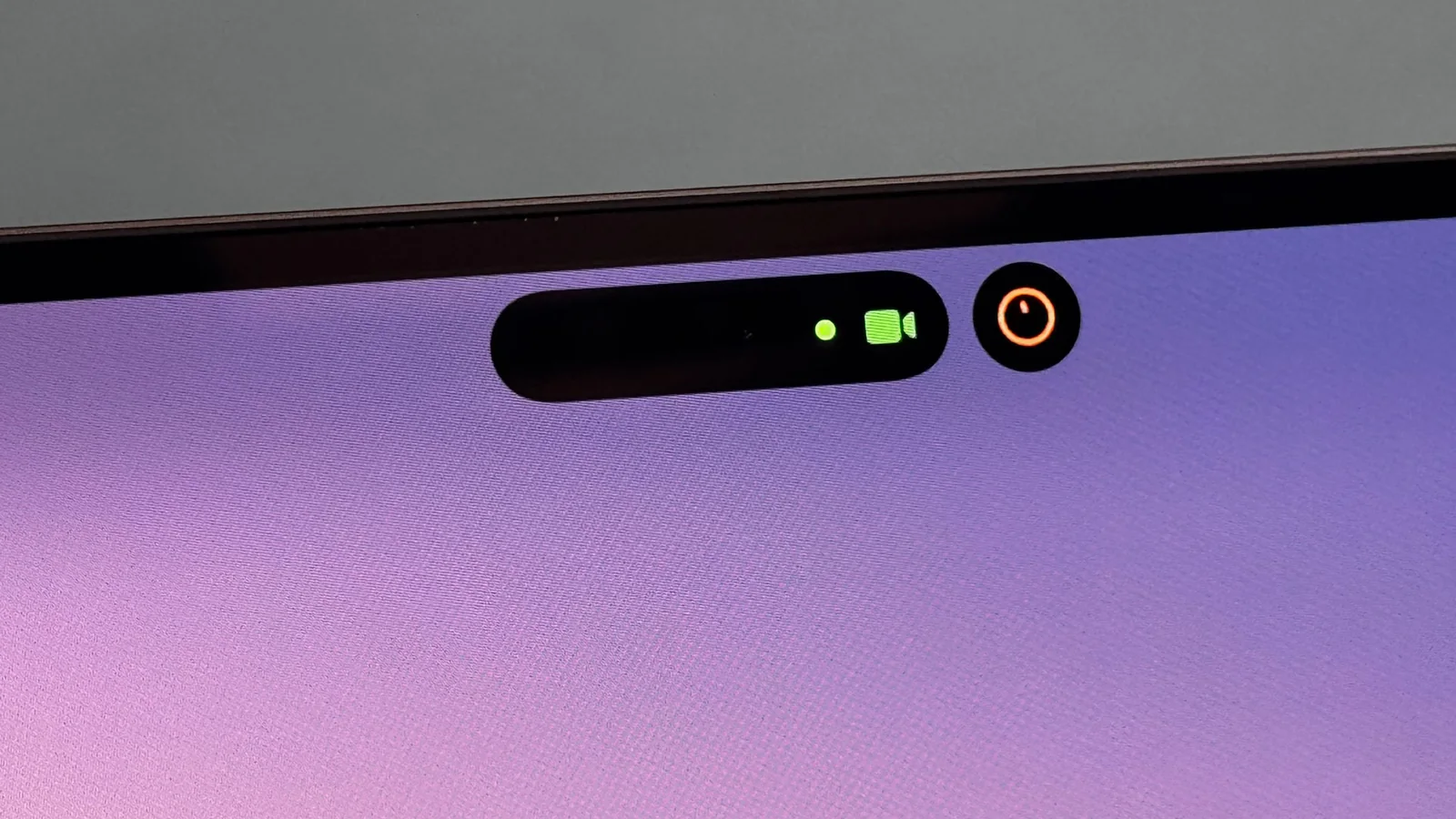
The aesthetic differences show up once you open the laptop. For one, the notch in the display is gone with the PROLED XDR models, replaced with the Dynamic Island from the latest iPhones. This feels far more natural and has added functionality.
Then there's the glowing Apple logo on the back of the lid. Because OLED panels only light up pixels when they're needed, Apple is making an aesthetic choice to power the logo with a bit of extra electricity this time. The glow matches the brightness of the display.
Apple's bezels are thinner, which has let Apple stretch the display to 16.3 inches on this new 16-inch model. The displays are now rounded on all four sides, which cuts some pixels on the bottom of the screen and looks a bit like an iPad.
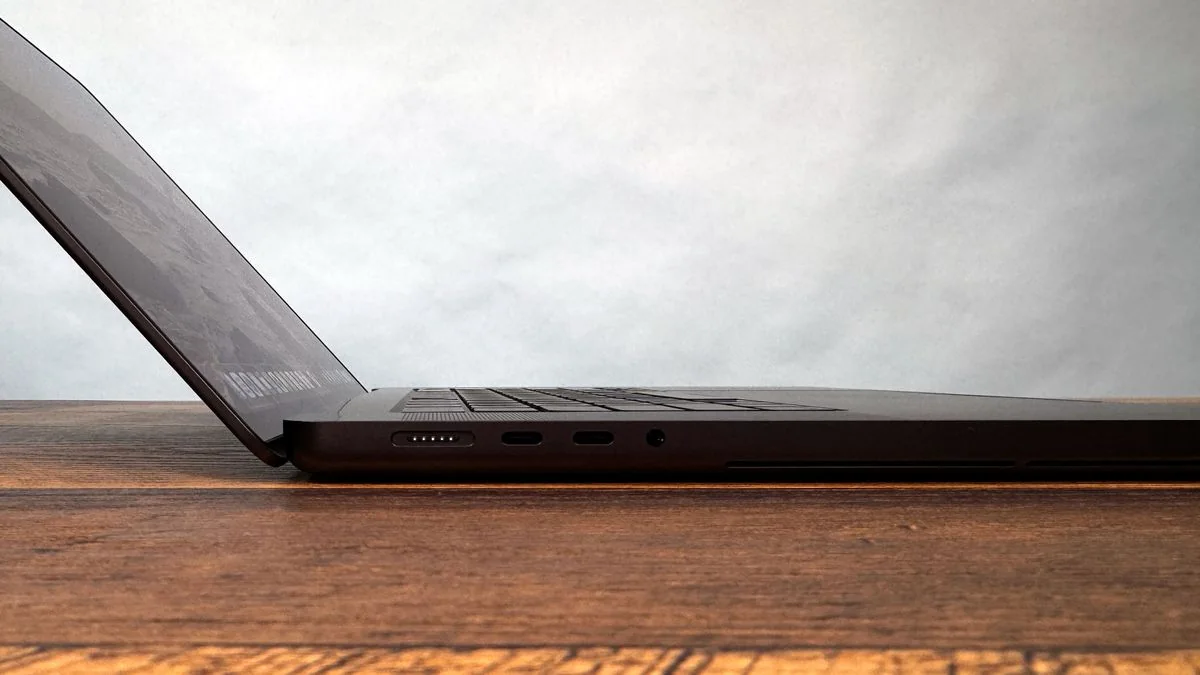
Otherwise, the system looks largely the same. You have the same ports: MagSafe 3, two Thunderbolt 5 ports, and a 3.5 mm headphone jack on the left; and an SD card reader, an additional Thunderbolt port, and HDMI output on the right.
But the OLED laptop feels different when you pick it up or put it in a backpack. Changes to cooling in the new 16-inch MacBook Pro with PROLED XDR and the switch to an OLED screen get the laptop down to 4.1 pounds with M5 Max, whereas the Liquid Retina versions are 4.7 pounds.
And that's lighter than some of its new competition, too. Microsoft's Surface Laptop Ultra with Nvidia's RTX Spark chip is 4.4 pounds and thicker at 0.75 inches. The Lenovo Pro 9n, also with RTX Spark and its own OLED screen, is a lighter 3.64 pounds and is thicker at 16.7 mm.
There has been talk of a sturdier hinge, but it does still wobble when you touch it. It would be nice to see a 180-degree hinge for people who really want to write or draw on a flat surface. For now, people who want that will need to stick to an iPad.
The new MacBook Pro design isn't a radical rethink of the ergonomics that have plagued touch laptops for over a decade. It's just a powerful Mac that happens to have a touchscreen.
Display Performance
We had to wait a long time to get OLED on a Mac. PROLED XDR is a stunning screen. It's the best screen I've ever seen on a notebook. Everything from the default wallpaper in macOS Golden Gate to videos and photos pop on this display. The blacks are deep, the colors pop, and it can get intensely bright.
Our review unit came with the 16.3-inch display with 3472-by-2266 native resolution, a variable refresh rate of 10 - 120 Hz, and touch support.
I used the PROLED XDR display to watch the finale of the latest season of Slow Horses. The display brought out the highlights in the environment, as well as a few red accent walls, and the deep blacks were impressive.
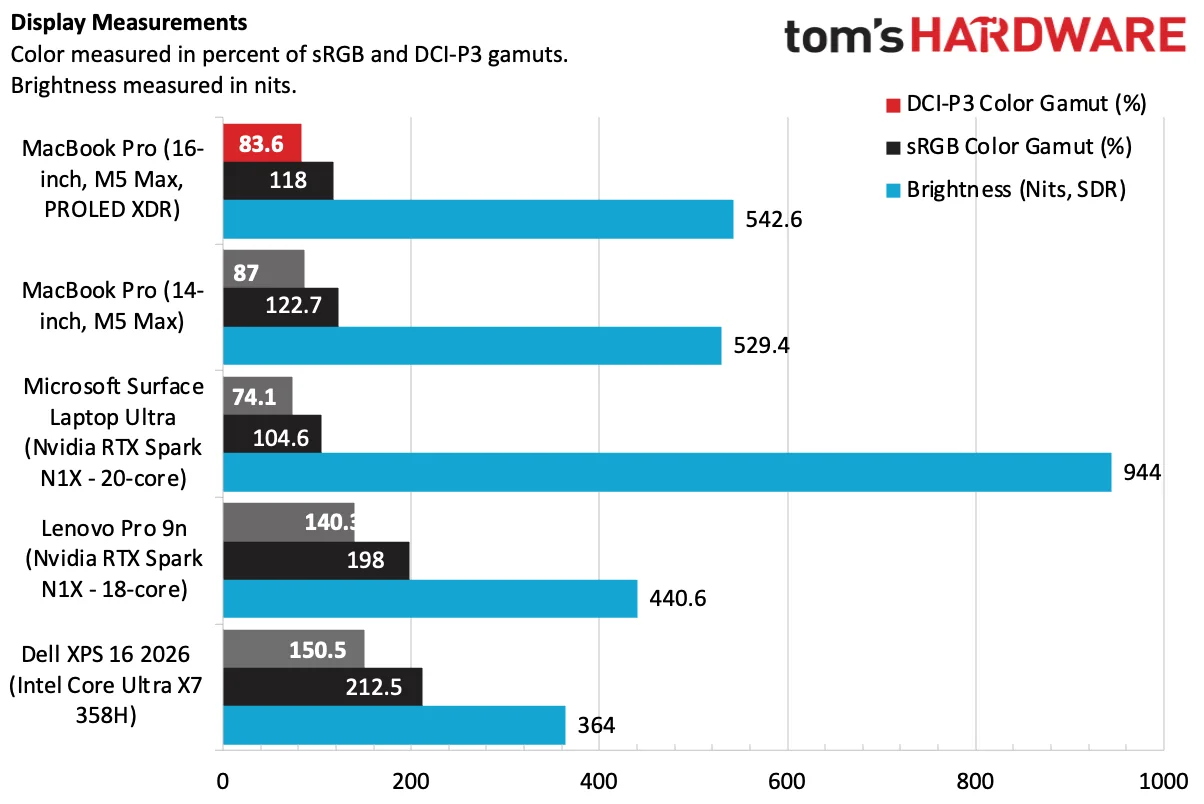
In our instrumented testing, the PROLED XDR screen covered 83.6% of the DCI-P3 color gamut by volume and 118% sRGB. Trust my eyes; there's no contest here compared to the mini LED version.
The MacBook Pro with PROLED XDR measured 542.6 nits in our SDR brightness test. While the Surface Laptop Ultra reached 944 nits, the PROLED screen simply looks better due to superior local dimming.
The OLED panel on the Lenovo Pro 9n is the most vivid on each gamut by volume, but I think it's a bit oversaturated. The tandem OLED on the Dell XPS 16 was also more vivid on measurements, but was far less bright.
The PROLED screen showed how bright it could get with HDR content, outputting 1,964 nits in our 40% HDR test.
Apple is offering more reference modes than ever before on a laptop, including various video, cinema, web and photography standards, and even DICOM medical imaging at 350 and 600 nits.
Apple is far from the first company to add OLED to a laptop, but this stands out among the best OLED laptop displays I've seen in recent memory. The price hike to get it will be out of reach for many.
We tested the MacBook Pro with a standard glossy finish. Reflections were minimal, even next to a window.
Software and Touch
Outside of OLED, there are two other additions to the MacBook Pro's screen.
The first is the Dynamic Island, a group of black pixels around the punch-hole webcam that can be used to show system alerts, notifications, and ongoing activities. It matches modern iPhones, and it's a huge change over the notch in other Macs.

The mouse can still move behind the Dynamic Island, but now the black area grows to indicate where the pointer is, and even wiggles if you make very small movements, to remind you where the cursor is.
The other much-discussed addition is the touchscreen. Apple hasn't reinvented the wheel here. Like most Windows and Chromebook makers, it added touch functionality onto a standard laptop.
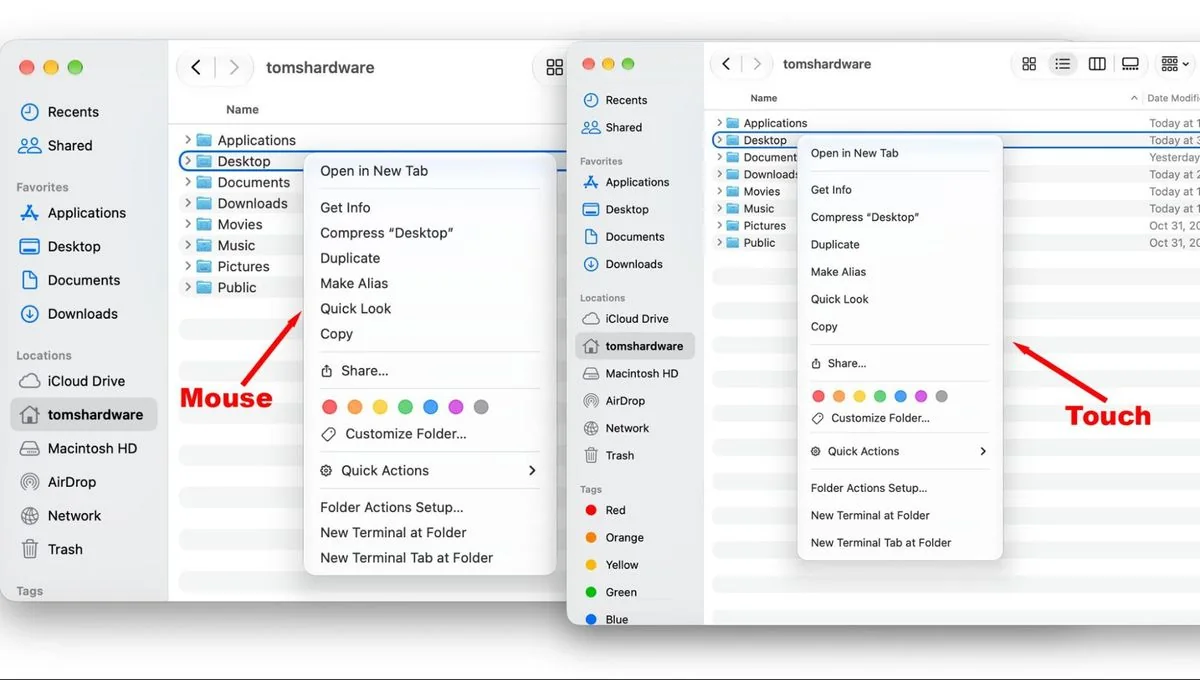
Apple has made slight adjustments to macOS 27 Golden Gate to accommodate touch. My personal favorite is that the "traffic lights" for maximizing, minimizing, or closing a window expand when you tap on them. When you click on a menu with your finger, the spacing is larger for easier touch targets.
Many gestures that work on the trackpad also work on the touchscreen, like pinch to zoom, accessing Mission Control, and moving between virtual desktops. Many apps have already been optimized for touch, but if they haven't, touch translates to a click.
One of my many experiments with the touch screen included swiping across the timeline in Final Cut Pro. I didn't find it any better than using the keyboard and mouse — just another option.
Perhaps my favorite use was in Blender, making adjustments to a 3D model I was sculpting. You could do everything I did with a mouse, but some features felt very natural with touch. That being said, after a few minutes, my arm was tired.
For those who never want to use touch, you can turn it off in disability settings. I don't see the harm in having it on, even if I don't see myself ever pulling to refresh on Safari when CMD + R is right there.
I found touch most useful for iPad apps on the App Store that work natively on Mac. It's also great for the iPhone simulator in Xcode, where developers can try out touch-based apps on their touchscreen Mac instead of using a pointer.
There's no touch tutorial. Touch is clearly a feature on these new MacBook Pros, but not the feature. Keyboard and mouse are clearly still king.
Audio
The six-speaker sound system in the 16-inch MacBook Pro's new design, complete with updated woofers and tweeters, keeps the crown in Apple’s camp for the best laptop speakers I've ever heard.
When I listened to music, I was floored by the drums. The low-end has improved, and deep drums and bass easily filled my apartment with deep, well-rounded sound.
Apple has made some adjustments to how the speaker sounds with the lid shut, too. It's still better than many other laptop speakers, with better bass.
Performance Benchmarks
We tested the new MacBook Pro with an M5 Max, 128GB of unified memory, and a 2TB SSD.
The main competitors we looked at featured Nvidia's RTX Spark N1X chips, including the Surface Laptop Ultra and the Lenovo Pro 9n. We also tossed in the Dell XPS 16 with a Core X7 358H.
Unsurprisingly, this MacBook Pro can tear through most people's everyday workloads. Apple has re-tooled the cooling in this system, and it was often close to, if not ahead of, the M5 Max we tested earlier this year in a 14-inch chassis.
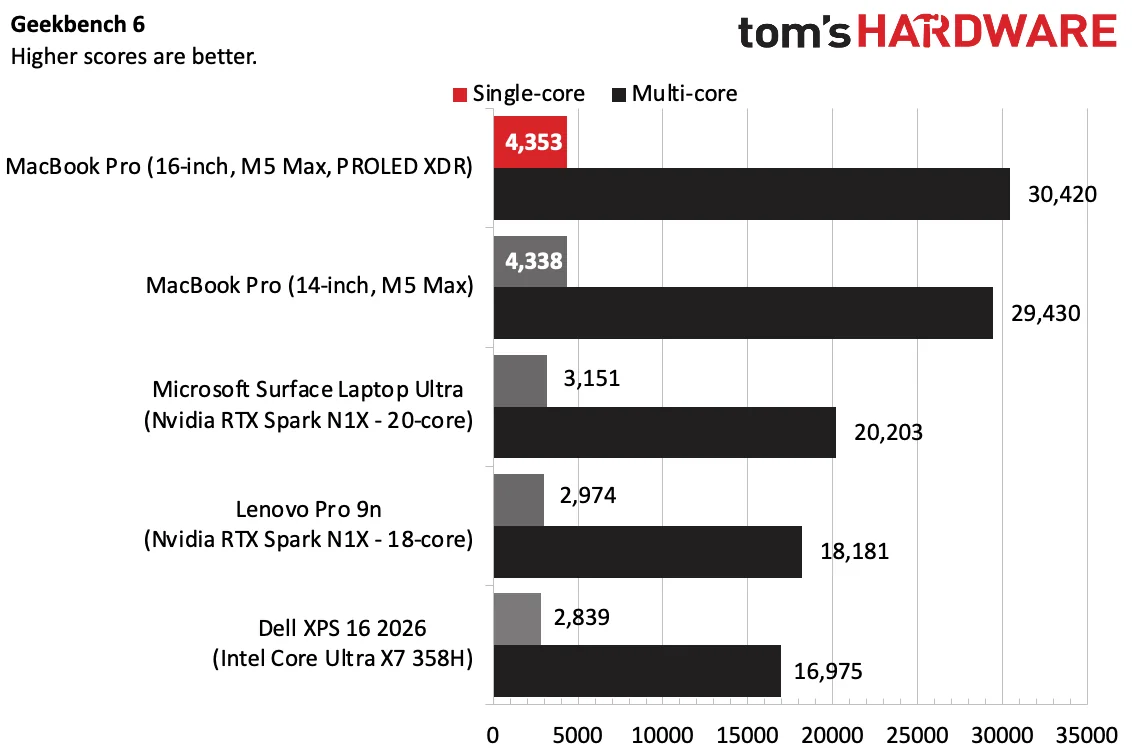
On Geekbench 6, the 16-inch MacBook Pro with PROLED XDR earned a score of 4,353 and a multi-core score of 29,430. Both of those scores are far ahead of the RTX Spark laptops and the Intel-based Dell.
The 2TB SSD copied roughly 25GB of files at a rate of 1,917.69 MBps, which is fast, though the 4TB SSD in the MacBook Pro we tested earlier this year was far faster.
On Handbrake, the 16-inch MacBook Pro transcoded a 4K video to 1080p in 1 minute and 43 seconds, the fastest of the bunch.
On the Xcode benchmark, the new 16-inch MacBook Pro beat the older 14-inch model with the same M5 Max by 7 seconds, completing the task in 80 seconds.
Our Cinebench 2026 stress test has systems go through ten runs of multi-core rendering. With high performance mode, which runs the fans harder and louder, the Mac started at a score of 9,647 and was far more stable.
Gaming and Graphics
The MacBook Pro with PROLED XDR display came with the same 40-core M5 Max GPU as the MacBook Pro we reviewed earlier this year.
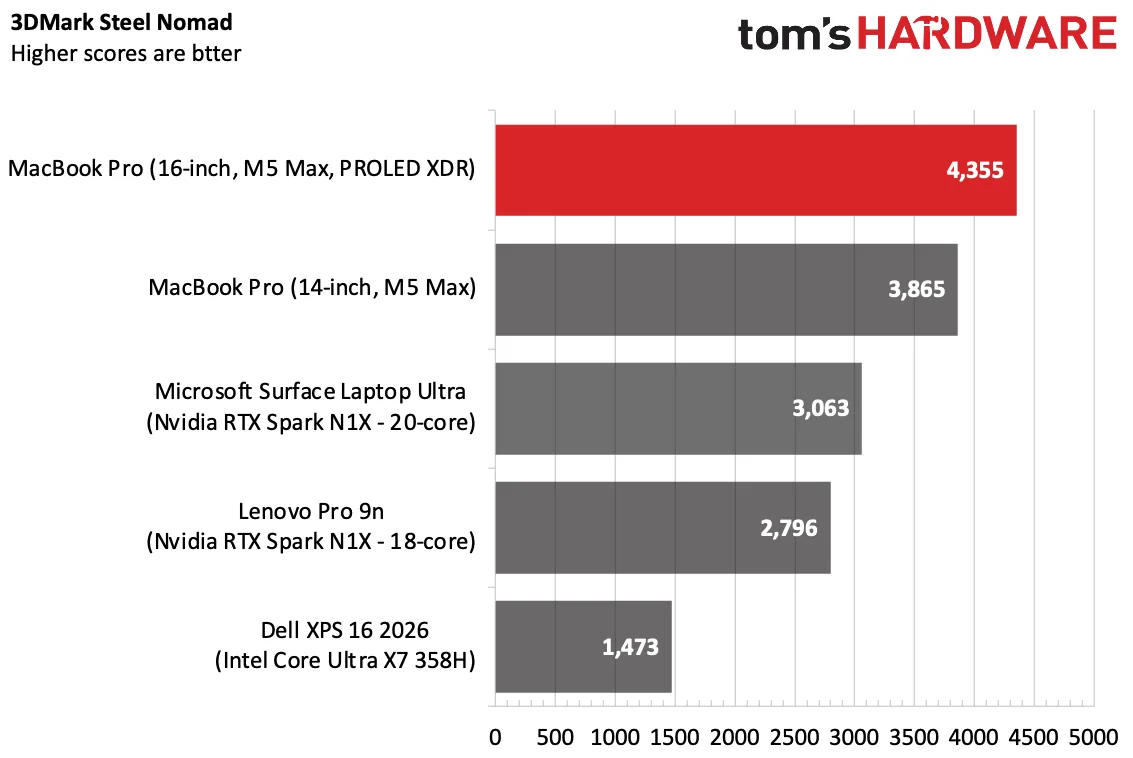
In the new chassis, the M5 Max scored 4,355 on 3DMark Steel Nomad, beating the old system (3,865) as well as both configurations of the RTX Spark.
Running Cyberpunk 2077's benchmark at 1920 x 1200 using our typical test settings (Ray tracing ultra), the game ran at 36.24 frames per second.
Keyboard and Touchpad
Of all the things that haven't changed on the MacBook Pro, the most familiar are the keyboard and touchpad.
I was blazing fast on the keyboard, hitting 131 words per minute with a 99% accuracy rate. Apple makes a comfortable keyboard with chiclet keys and a smart layout.
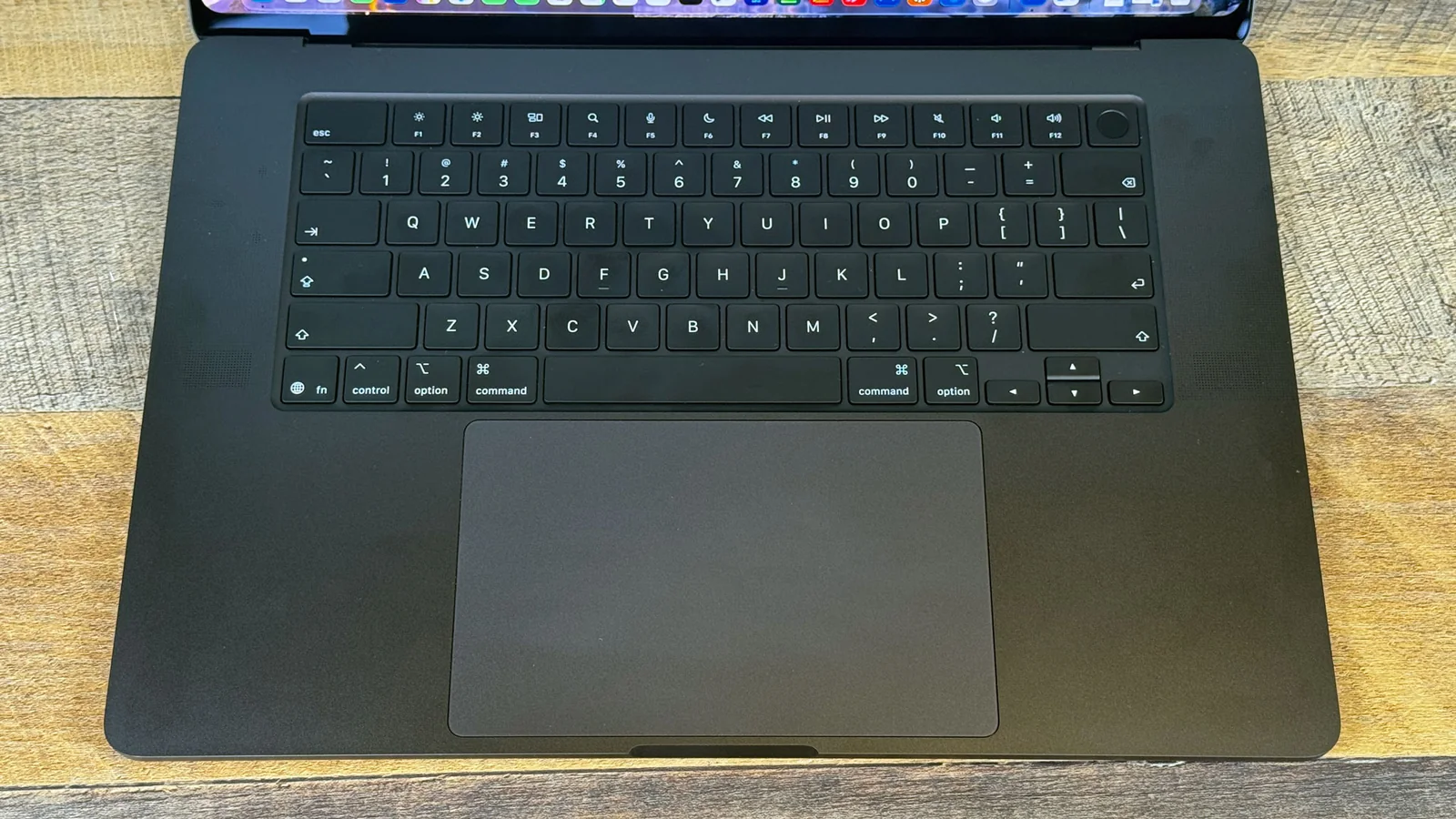
The massive trackpad features smooth glass, comfortable haptics, and intuitive gesture support in macOS. After years of Windows laptops adding haptic trackpads to catch up, Apple's touchpad still feels great.
Upgradeability
While there are just four Torx Screws on the bottom of the MacBook Pro, there isn't much in the way of upgrading. Apple puts the RAM in the chip, and the storage is soldered down.
Like other Macs, you should make sure you get the spec you need when you buy. Unfortunately, that's not unusual given the price of memory in the greater industry right now.
Battery Life
Apple's 99.6 WHr battery allows for a longer-lasting OLED laptop than its competitors, but in our testing, mini-LED model still lasts longer.
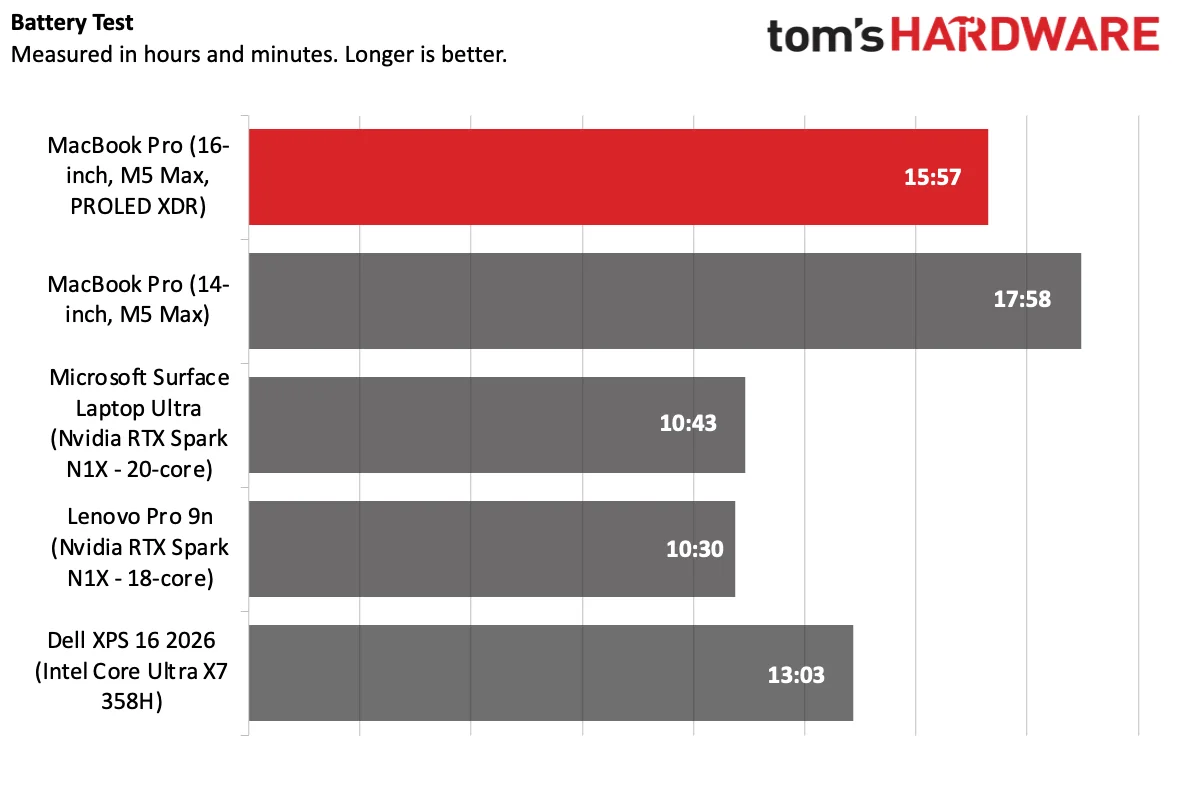
The 16-inch MacBook Pro with the PROLED XDR display lasted 15 hours and 57 minutes, far ahead of the OLED screen on the Lenovo Pro 9n (10:30) and the tandem OLED panel on the Dell XPS 16 (13:03).
The nearly 16-hour runtime is slightly short of Apple's "up to 17 hours" claim for web browsing. The only laptop that did better on our battery test was the 14-inch M5 Max laptop we tested earlier this year.
Heat
The MacBook Pro can get a bit toasty under heavy load, though it's nothing I would deem unusable. New cooling changes the direction of the airflow in the machine, moving it out and through the back rather than out from vents near the display.
During our Cinebench 2026 stress test, the keyboard measured 106.6 degrees Fahrenheit. The touchpad was a cooler 88 F, while the hottest point on the bottom measured 107 F.
The overall temperature from the computer's other sensors was an average of 51 degrees Celsius.
Webcam
The 12-megapixel Center Stage webcam on the MacBook Pro will serve you well even on the most professional call. It looked great in meetings, even in one difficult lighting scenario.
I could easily smooth that mix out using the MacBook Pro camera's studio light or edge light effects, too.
Software and Warranty
We tested this new MacBook Pro with macOS 27 Golden Gate, which we highlighted on the Mac Studio, with new Apple Intelligence features, and the new Siri based on Apple Foundation Models and Gemini.
Apple's software suite includes Safari, Messages, Photos, Maps, Notes, and Reminders. Pages, Keynote, and Numbers are still in the dock by default.
Apple sells the MacBook Pro with PROLED XDR Display with a one-year warranty. AppleCare+ extends protection for $17.99 per month or $179.99 per year.
Configurations
We reviewed the MacBook Pro with PROLED XDR Display in a high-end, $7,399 configuration with an M5 Max (18 CPU cores, 40 GPU cores), 128GB of memory, and 2TB of storage.
The cheapest versions of these machines are a $2,899 14-inch system or a $3,399 16-inch laptop. Both base configurations come with 24GB of RAM and 1TB of storage.
Moving to the M5 Max moves you to $4,499 on the 14-inch laptop and $4,799 on the 16-incher for an 18-core CPU and a cut-down 32-core GPU. The full 40-core GPU is another $300.
RAM starts at 24GB, and costs $600 to go to 48GB or, on the 16-incher, $1,000 for 64GB. Storage prices are also astronomical, with a $1,000 jump between the 2TB and 4TB tier.
These are exceptionally expensive computers. Apple's 14- and 16-inch MacBook Pros without the OLED screens are still there, however, starting at $1,999 for a 14-inch notebook with M6.
Apple sells the systems at full price, or divided up into 12 monthly payments through an installment plan. They're also available for lease through Apple Upgrade.
Bottom Line
The MacBook Pro with PROLED XDR display isn't a radical redesign, but it has a bunch of small changes that add up to significant improvements over previous models. The tandem OLED screen is a treat to look at, and the weight reduction is significant.
Performance from the M5 Max is still strong, though if you're doing simple work, you can get much better single-core performance out of an M6 Macbook Pro.
With no major redesign, however, Apple hasn't done anything to make touching the laptop any more comfortable than its competitors. It ultimately does get tiring. Touch really is here because it's table stakes at this point.
Far more Mac user deserves a screen this good, and I hope that some flavor of OLED eventually makes it to the entry-level MacBook Pro and even the MacBook Air.
But the starting price for the systems with PROLED displays are high, and upgrades make them exceptionally expensive. For now, the best screens in the Mac lineup are limited to just these systems.
Those with the deep pockets to make the investment, though, are in for one heck of a screen.