Physical Navigation Keys
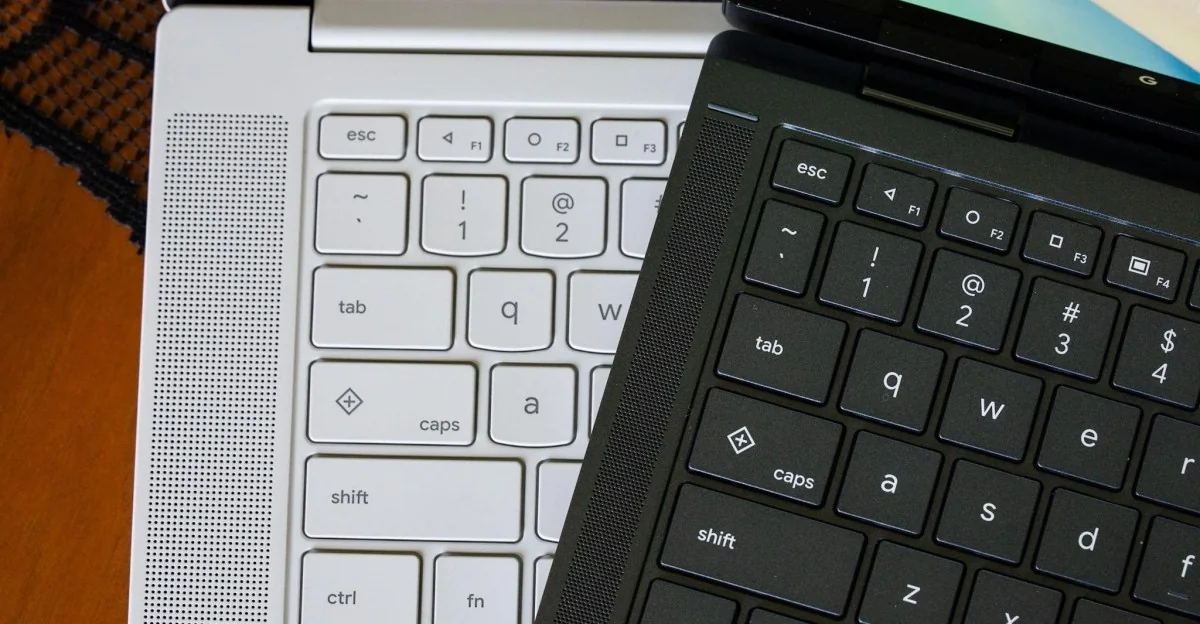
A common misconception with Googlebooks is that the Quick Insert and Google logo keys are new, but they debuted a couple of years ago on some Chromebooks. However, there is a new feature for Googlebooks that is taken straight from older Android phones.
Android’s physical navigation buttons are back on Googlebooks
An oldie but a goodie — and kind of a necessity-die.
What year is it, and what dessert name of Android are we up to?
Functionality and Use Cases
On every Googlebook keyboard, the F1, F2, and F3 keys feature the triangle, circle, and square navigation icons that first appeared on Android 5.0 Lollipop. These served as the back, home, and app switcher buttons prior to gesture-based navigation, and they remain available as an alternative on modern Android devices. On Googlebook OS, the left-pointing triangle functions as a back button, the circle minimizes open apps to go home, and the square tiles open apps.
If I stare at these keys long enough, I can pretend I’m holding my old Nexus 6.
Desktop Integration
Having these physical buttons standardized across all Googlebooks proves useful, particularly when running Android apps that lack optimization for desktop interfaces or mouse controls. The back button provides a reliable fallback, though desktop peeking requires a separate keyboard shortcut.
For long-time Android users, the inclusion of these legacy buttons offers a nostalgic touch while serving a practical purpose as a fallback navigation method.