PixelMob Portable AI Workstation: 30-second review
Display: 7-inch OLED touchscreenBrightness: 1,100 nitsOperating system: AndroidMemory: 12GB LPDDR5 RAMInternal storage: 256GB as standardStorage expansion: Three M.2 slots, supporting up to 24TB total storageCard slots: CFexpress Type B, SD and microSDConnectivity: USB-A, USB-C, HDMI input, HDMI output, LAN and 3.5mm headphone jackCFexpress transfer speed: Up to 800MB/sInternal battery: 11,600mAhExternal battery: Sony NP-F compatibleDimensions: 104 x 195 x 25mmWeight: 550g
If digital creatives, from photographers to videographers, were to design a piece of kit, it would be the PixelMob Pro. It’s essentially a fully featured asset manager that lets you plug in a variety of storage media from cameras or external hard drives, then organise and edit them onto its internal storage, all through its large touchscreen interface.
The system runs on Android, and much of the interface and usability will feel familiar to many. Still, dedicated apps such as Lightbox, Sequence, Cones, and Framebox let you manage and edit all the files, and in addition to these there are a few familiar apps that you can download as well, such as CapCut, Lightroom and a selection from DJI; there’s even a direct connection to Cloud Storage for additional backup.
Getting started was straightforward, with a few small workflow issues, such as setting up a lightbox, before things really started to make sense.
Before getting properly started, firmware updates took a good hour. However, after a restart and refresh, the device was finally set and ready to go.
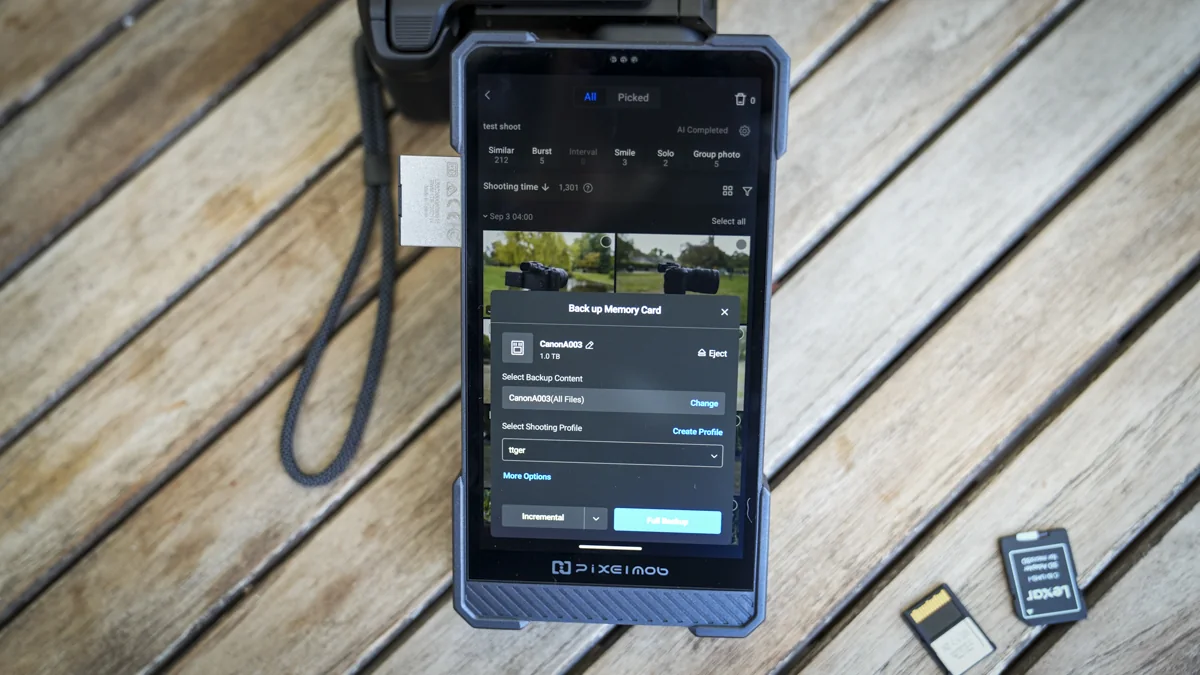
When plugging in an SD card, it took about 5 to 10 seconds for it to appear, ready for the files within to be either partially or fully downloaded and backed up to the internal drive. The whole process is relatively straightforward. However, users need to set up a Lightbox before starting, which takes some initial familiarization.
If files are downloaded directly without first creating a Lightbox, navigation and file management are restricted, making it an integral part of the workflow. Software updates have addressed most initial friction points, though brief tooltips would improve the initial user experience.
However, once users get used to the workflow, it runs smoothly with plenty of input options, including USB, USB-C, SD, microSD and CFexpress Type B. A Type B to Type A adaptor is also included in the box for broader camera compatibility.
Once users adapt to Lightbox, Sequence, and Cones, the device proves its value. For outdoor photographers or videographers looking to back up image and video files, the PixelMob elevates portable asset management significantly.
However, while form and function are largely superb, minor software workflow hurdles remain, alongside a few physical build observations.
There are certain build-quality considerations, as the outer casing doesn't feel as premium as expected, carrying a slightly prototype-like finish.
The inclusion of a standard Sony NP-F battery mount at the back is superb for battery longevity. However, the battery fit is slightly loose, resting in place rather than locking firmly despite the security latch.
The mounted NP-F battery also conveniently doubles as a sturdy physical stand.
Certain CFexpress Type B cards experienced long recognition times, and a couple of larger 1TB and 2TB models went unrecognized, requiring a separate card reader plugged into the USB-C port.
Aside from minor build and recognition quirks, the unit is solid. The default 256GB internal storage is supplied via an M.2 2280 module.
The internal storage can be upgraded, with three M.2 slots available and support for up to 8TB modules, potentially yielding up to 24TB of internal capacity.
Equipped with UniDrive NAS software, cloud backup support, and a rear LAN port, the device serves as a comprehensive backup solution for studio and field environments alike.
Once minor workflow refinements and outer casing updates are addressed, the device positions itself as an essential tool for professional creators.
PixelMob Portable AI Workstation: Price & availability
The PixelMob has launched through a Kickstarter campaign as the PixelMob Portable AI Workstation for Creators, with updates provided via official channels.
PixelMob Portable AI Workstation: Design & build
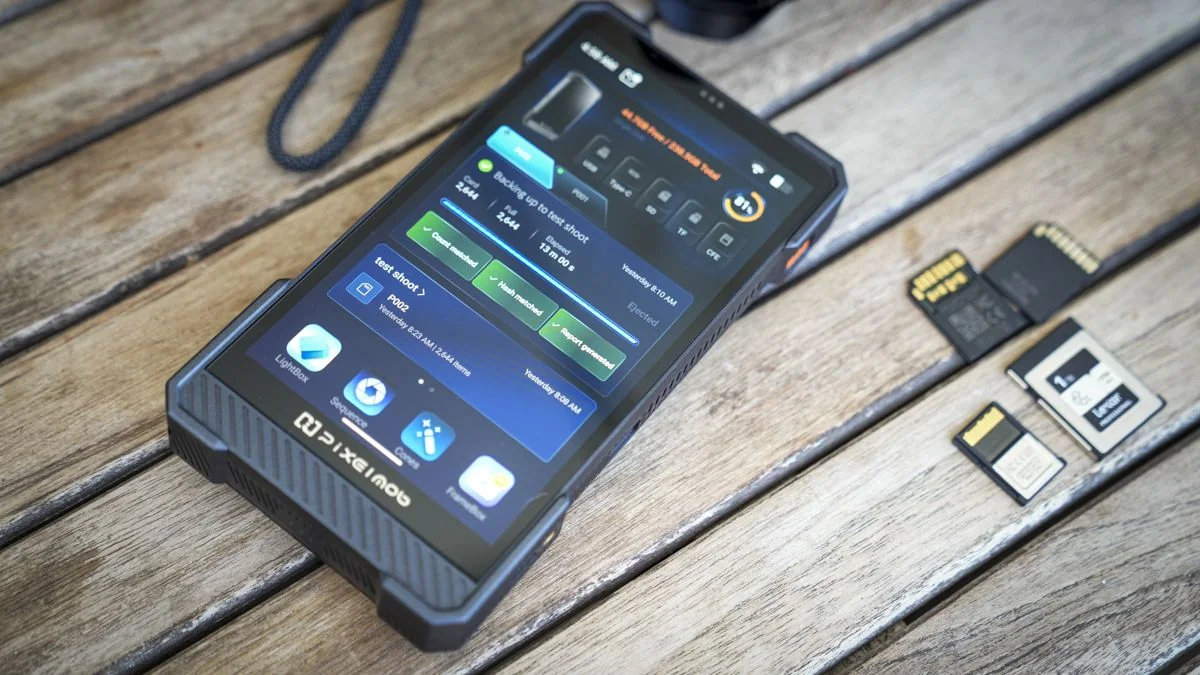
The PixelMob features an outdoorsy, rugged design resembling an oversized mobile phone or tough tablet, housing a 7-inch OLED screen.
It features a peak brightness of 1,100 nits and runs on Android, supporting compatible apps from drone manufacturers, mobile phones, and cameras.
The device can connect directly to cameras such as the Sony A7 IV, acting as a professional monitoring system, secondary screen, and backup destination for full-resolution files.
Measuring 104 x 195 x 25mm and weighing 550g, its footprint sits between a large smartphone and a small tablet.
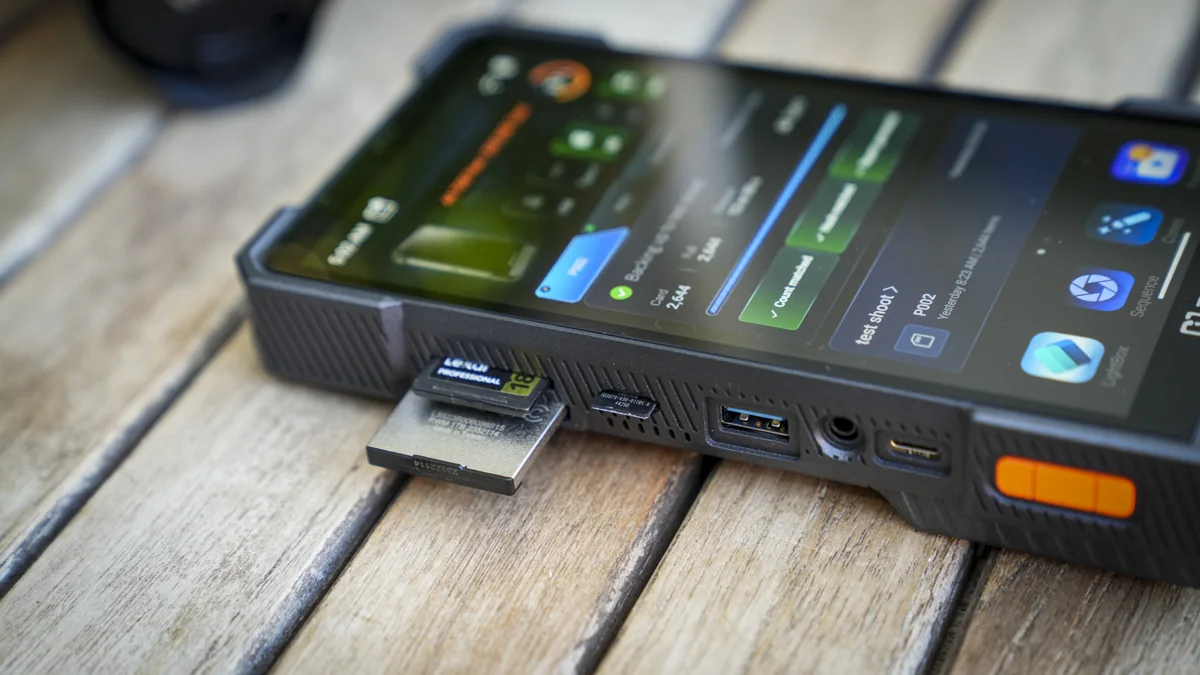
Physical connections include CFexpress Type B supporting up to 800MB/s transfer speeds, SD, microSD, USB-A, and multiple USB-C ports alongside a power button.
The top panel houses dual HDMI ports (input and output), a USB-C port, and a LAN port, while the rear accommodates an NP-F battery mount.
Internally, it integrates 12GB of LPDDR5 RAM and 256GB of baseline storage, expandable via two additional M.2 slots up to 24TB total capacity.
An 11,600mAh internal battery powers the device for two to three hours under heavy loads or roughly six hours during lighter use, with standby lasting over a week.
The initial impression of the exterior finish is mixed, as the plasticky housing feels less robust than expected for field operations.
Despite a slightly cheap exterior feel, the casing withstood normal backpack transport during evaluation.
Access to the rear drive panel is secured by a single crosshead screw, and a minor rattle can be detected around the power button area when shaken.
Minor build imperfections slightly detract from an otherwise extraordinary piece of hardware.
PixelMob Portable AI Workstation: Features
The PixelMob is engineered to quickly offload camera storage cards in the field, facilitating immediate file review, management, editing, and tethered shooting control.
Intelligent onboard software and the Android platform allow easy integration into professional or enthusiast media workflows.
For photographers, videographers, and mobile creators, the unit serves as a comprehensive data transfer, viewing, and processing platform.
Stored content can be edited locally or output via HDMI to larger external screens for media playback.
Built-in AI features scan stored files to provide smart subject recognition and automated organization.
The 7-inch screen functions as an external camera monitor when connected via HDMI, bridging cameras with larger recording setups.
Additional applications support tethered shooting, video review, and specialized creative capture modes.
On-site previews and local file organization streamline mobile media management significantly.
Media compatibility covers CFexpress Type B, CFexpress Type A via adapters, SD UHS-II, and microSD cards.
External USB-A and USB-C devices are also supported, though expanding the base 256GB storage with an extra M.2 drive is recommended for heavy workloads.
The internal battery sustains roughly two hours of heavy card ingestion, making supplementary power sources necessary for intensive field sessions.
Support for standard Sony NP-F batteries allows creators to utilize existing accessory power inventories to extend operating time.
Specialist camera control features include time-lapse video, star trails, HDR bracketing, focus bracketing, and panorama merging assistance.
Cloud backup integration provides an additional layer of data redundancy when connected to networks.
Overall, the device packs an extensive wishlist of creator-focused features into a portable hardware footprint.
PixelMob Portable AI Workstation: Performance
The device presents a distinct size profile between a smartphone and a tablet, offering robust processing capabilities for mobile creators.
Initial setup involves fully charging the battery and processing firmware and system updates.
Initial system and AI processing updates take roughly 30 minutes to complete before full operation can begin.
The Android-based interface grants access to pre-approved third-party applications via a dedicated app menu.
Supported third-party tools include DJI apps, Adobe Lightroom, Snapseed, and Sony's Monitor & Control app for camera integration.
Ecosystem compatibility is expected to expand to other major camera brands as software development progresses.
Inspecting the internal storage reveals two additional M.2 expansion slots alongside the pre-installed 256GB drive.
Upgrading with high-capacity SSDs allows up to 24TB of internal storage, matching desktop studio NAS capacities.
High-capacity internal storage allows extensive media archiving directly on the mobile unit during multi-day shoots.
Adding a 1TB M.2 drive alongside the stock 256GB module provides a balanced storage upgrade without excessive cost.
Formatting new drives via the UniDrive application is straightforward and integrates smoothly into the file management workflow.
Once formatted, offloading files from CFexpress, SD, and microSD cards proceeds without issue.
Card readers and adapters accommodate various professional camera media formats seamlessly.
The system recognizes inserted media cards within five seconds, allowing quick file transfers once a Lightbox project folder is established.
Imported files are automatically processed by onboard AI to generate metadata tags and differentiate RAW and JPEG formats.
Thumbnail rendering is exceptionally fast, often outperforming traditional desktop applications like Adobe Bridge.
Burst shots are automatically recognized and grouped together to simplify sorting through large batches of images.
Facial recognition and similarity matching help categorize people and scenes effectively.
Configurable AI settings include assistant tools, portrait detection, bird recognition, and empty-scene detection.
Selected images can be rated, flagged, color-adjusted, or edited further using the built-in Cones image editor.
While loading large JPEG files can occasionally incur a slight delay, applying filters and adjustments is responsive and slick.
The Cones application supports stacking edits for star trails, astro time-lapses, and focus-bracketing sequences directly on the device.
Built-in video editing tools are available via Framebox, though third-party apps like CapCut offer alternative editing workflows.
Wired and wireless mirrorless camera integration enables advanced tethered shooting and live monitoring.
Connecting via USB-C with PC Remote enabled displays a live-stream feed directly from compatible cameras.
Simulated long-exposure sequences can be configured and triggered automatically to capture multi-shot blended exposures.
Image stacking processes multiple exposures into a single simulated long-exposure shot without requiring physical neutral density filters.
Standard tethered shooting instantly transfers captured stills directly to the device storage for immediate review.
Tethered controls apply to stills, while video recording requires switching to dedicated HDMI monitoring applications.
Video monitoring and direct recording are handled by the Deck application, supporting variable bitrates from 5 to 50Mbps.
LUT application for color grading adds flexibility, making it a capable monitor for creators despite differing from dedicated studio recorders.
Should you buy the PixelMob Portable AI Workstation?
Ultimately, the PixelMob stands out as an exceptionally feature-rich mobile workstation for photographers and videographers, integrating storage, editing, and monitoring into a single unit.
It unifies portable storage, AI organization, tethered shooting, and video handling with expandable internal capacity.
However, workflow refinements are needed to streamline app navigation, card compatibility can be inconsistent, and the outer casing finish feels somewhat plasticky.
Despite minor limitations, the system's flexibility and capability make it a standout addition to professional creative workflows.